
With the help of this function, customers can call up products via QR code or barcode and add them to the basket. A scanner icon in the search field opens the camera in full-screen mode. If a URL is scanned, a direct redirection takes place. If, on the other hand, a barcode is scanned, the product with the scanned ID is placed directly into the basket.
Modules
The following modules are relevant for the integration of Scan & Order:
- $wsViews - current URL, destination pages, view URLs
Frontend integration
Dependencies
The scanner is based on the open-source library html5-qrcode. The file html5-qrcode.min.js is stored in the scripts/ directory and is only included via lazy load when the scanner is opened.
The button is placed directly in front of the search field within the ws-search-box component and opens the scanner. Depending on the end device, it appears in the following locations:
- in the desktop search bar of the header

- in the mobile offcanvas navigation menu
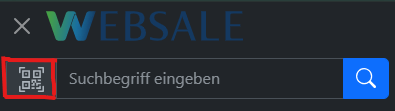
The integration into the header is done via the file components/layout/header.htm:
<ws-search-box ...>
<button type="button"
class="btn btn-light border rounded-start"
aria-label="%%QRCodeBtnTitle%%"
data-bs-toggle="modal"
data-bs-target="#wsQRCodeScanModal">
<svg xmlns="http://www.w3.org/2000/svg" width="25" height="25" fill="currentColor" viewBox="0 0 16 16">
<path d="M0 .5A.5.5 0 0 1 .5 0h3a.5.5 0 0 1 0 1H1v2.5a.5.5 0 0 1-1 0v-3Zm12 0a.5.5 0 0 1 .5-.5h3a.5.5 0 0 1 .5.5v3a.5.5 0 0 1-1 0V1h-2.5a.5.5 0 0 1-.5-.5ZM.5 12a.5.5 0 0 1 .5.5V15h2.5a.5.5 0 0 1 0 1h-3a.5.5 0 0 1-.5-.5v-3a.5.5 0 0 1 .5-.5Zm15 0a.5.5 0 0 1 .5.5v3a.5.5 0 0 1-.5.5h-3a.5.5 0 0 1 0-1H15v-2.5a.5.5 0 0 1 .5-.5ZM4 4h1v1H4V4Z"/>
<path d="M7 2H2v5h5V2ZM3 3h3v3H3V3Zm2 8H4v1h1v-1Z"/>
<path d="M7 9H2v5h5V9Zm-4 1h3v3H3v-3Zm8-6h1v1h-1V4Z"/>
<path d="M9 2h5v5H9V2Zm1 1v3h3V3h-3ZM8 8v2h1v1H8v1h2v-2h1v2h1v-1h2v-1h-3V8H8Zm2 2H9V9h1v1Zm4 2h-1v1h-2v1h3v-2Zm-4 2v-1H8v1h2Z"/>
<path d="M12 9h2V8h-2v1Z"/>
</svg>
</button>
<input type="search" name="query" ...>
...
</ws-search-box>
The button must be placed identically both in the desktop header and in the mobile offcanvas menu. Using the attribute aria-label=%QRCodeBtnTitle%, the shop text snippets are used for accessibility.
Modal window
The full-screen modal is inserted once in the base layout. The area #wsQRScanner is responsible for displaying the camera preview from HTML5-QR-Code.
The integration is done via the file layouts/default.htm:
<div id="wsQRCodeScanModal" class="modal" tabindex="-1">
<div class="modal-dialog modal-fullscreen">
<div class="modal-content">
<div class="modal-header">
<p class="h5 modal-title">
<svg xmlns="http://www.w3.org/2000/svg" width="35" height="35" fill="currentColor"
class="me-2 align-top" viewBox="0 0 16 16">
<path d="M0 .5A.5.5 0 0 1 .5 0h3a.5.5 0 0 1 0 1H1v2.5a.5.5 0 0 1-1 0v-3Zm12 0a.5.5 0 0 1 .5-.5h3a.5.5 0 0 1 .5.5v3a.5.5 0 0 1-1 0V1h-2.5a.5.5 0 0 1-.5-.5ZM.5 12a.5.5 0 0 1 .5.5V15h2.5a.5.5 0 0 1 0 1h-3a.5.5 0 0 1-.5-.5v-3a.5.5 0 0 1 .5-.5Zm15 0a.5.5 0 0 1 .5.5v3a.5.5 0 0 1-.5.5h-3a.5.5 0 0 1 0-1H15v-2.5a.5.5 0 0 1 .5-.5ZM4 4h1v1H4V4Z"/>
<path d="M7 2H2v5h5V2ZM3 3h3v3H3V3Zm2 8H4v1h1v-1Z"/>
<path d="M7 9H2v5h5V9Zm-4 1h3v3H3v-3Zm8-6h1v1h-1V4Z"/>
<path d="M9 2h5v5H9V2Zm1 1v3h3V3h-3ZM8 8v2h1v1H8v1h2v-2h1v2h1v-1h2v-1h-3V8H8Zm2 2H9V9h1v1Zm4 2h-1v1h-2v1h3v-2Zm-4 2v-1H8v1h2Z"/>
<path d="M12 9h2V8h-2v1Z"/>
</svg>
%%QrScan%%
</p>
<button type="button" class="btn-close" data-bs-dismiss="modal" aria-label="%%Close%%"></button>
</div>
<div class="modal-body position-relative">
<div id="wsQRScanner" class="h-100"></div>
</div>
</div>
</div>
</div>
JavaScript constant
The path to the library is set as a JavaScript variable in the {{ autoescape "js" }} block of the layout file layouts/default.htm.
{{ autoescape "js" }}
{{ var $cAddToBasketTarget = $wsViews.viewUrl("basket.htm") }}
{{ var $cAddToBasketParams = { wscsrf: $wsActions.csrfToken, quantity: 1 } }}
{{ var $cAddToBasketLink = $wsActions.url("BasketItemAdd", $cAddToBasketTarget, $cAddToBasketParams) }}
<script>
const wsQRCodeJS = "{{= static('scripts/html5-qrcode.min.js') }}";
const wsAddToBasketLink = "{{= $cAddToBasketLink }}";
</script>
{{ /autoescape }}
Scanner logic
The following code block is to be inserted into the file scripts/wsGlobal.js. The flow is as follows:
- When the scanner is opened for the first time,
html5-qrcode.min.js is loaded.
- If the library was already loaded, the scanner is started directly via
wsInitQRScan().
html5-qrcode starts the camera and shows the preview in the #wsQRScanner area.
- After a successful scan, URL codes redirect directly to the scanned URL — barcodes place the product with the scanned ID directly into the basket.
- When the window is closed, the camera is stopped.
// ---------------------------------------------------------- QR code scanner - start
// const html5QrCode and function wsInitQRScan is in script html5-qrcode.min.js
function wsInitQRScan() {
Html5Qrcode.getCameras().then(devices => {
if (devices && devices.length) {
// use this to start scanning
html5QrCode.start(
{
facingMode: "environment"
},
{
fps: 10,
qrbox: { width: 250, height: 250 }
},
(decodedText, decodedResult) => {
// do something when code is read
html5QrCode.stop().then((ignore) => {
// QR Code scanning is stopped
if (decodedText.startsWith("http")) {
// execute QR code if code is a URL
location.href = decodedText;
} else {
// execute WEBSALE search if Barcode
location.href = wsAddToBasketLink + "&productId=" + decodedText;
}
}).catch((err) => {
// Stop failed, handle it
});
},
(errorMessage) => {
// parse error, ignore it
})
.catch((err) => {
// Start failed, handle it
}
);
}
}).catch(err => {
// access denied
});
}
document.querySelector("#wsQRCodeScanModal").addEventListener("show.bs.modal", function(e) {
var wsQRCodeScanScript = document.querySelector("#wsQRCodeScanScript");
if (!wsQRCodeScanScript) {
// lazyload script for better performance
var script = document.createElement("script");
script.setAttribute("id", "wsQRCodeScanScript");
script.setAttribute("src", wsQRCodeJS);
document.head.appendChild(script);
} else {
// execute function if script is already loaded
wsInitQRScan();
}
});
document.querySelector("#wsQRCodeScanModal").addEventListener("hidden.bs.modal", function(e) {
html5QrCode.stop().then((ignore) => {
// QR Code scanning is stopped
}).catch((err) => {
// Stop failed, handle it
});
});
// ---------------------------------------------------------- QR code scanner - end
Further links