
shop.config.
The reuse of elements is a central principle of WEBSALE V8s. Includes are references to HTML files whose content is embedded in whole or in part in other files. Typical candidates are headers and footers, the navigation, graphics such as the company logo, but also texts such as company information, terms of withdrawal, or privacy information. The benefit lies in maintenance: you change the text in one place, and it is up to date everywhere.
WEBSALE V8s knows three types of includes, which differ in their purpose:
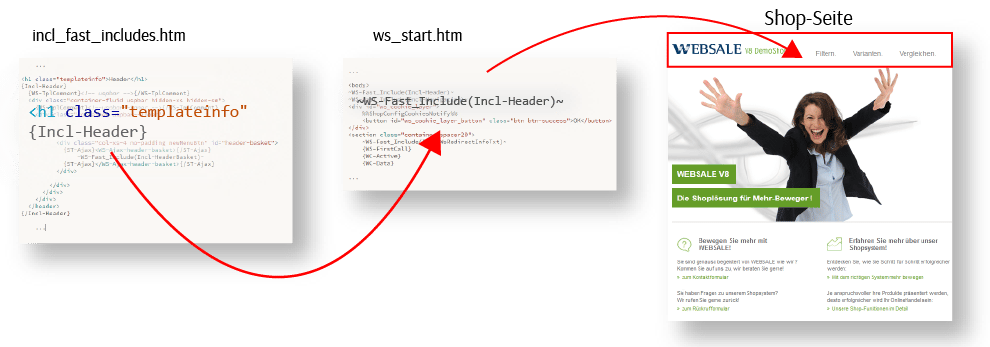
FastInclude: collected includes
The HTML fileincl_fast_includes.htm is a standard module of every shop. It gathers frequently used elements in one place, from which they are pulled into individual pages of the shop. The advantage over many small files is clarity: all recurring building blocks are listed below each other in one file. As a designer, you are free to use them.
Define and include sections
In the FastInclude file, you define named include sections. The section name starts with the prefixIncl-.
WS-Fast_Include() tag. In the parentheses, you write only the section name, not the file name. Which file is meant is defined in the shop configuration.
Register the FastInclude file in shop.config
So that the shop knows which file the sections come from, enter the source in the shop configurationshop.config in the <Templates> section.
Multiple FastInclude files
You are not limited to a single collection file. Multiple files are worth it in two cases. First, if you want to organize your reused elements by type, for example HTML separately from JavaScript. Second, during larger reconstruction work on the shop, because this way you can maintain a second file for test scenarios alongside the productively used file and the shop remains fully functional throughout. Each additional file needs its own entry inshop.config and is addressed via its own tag.
The freely named form
FastIncludes_<ID> is the more flexible one. You choose the ID after the underscore yourself, and it appears unchanged in the tag. In the example above, FastIncludes_basket is therefore addressed via ~WS-Fast_Include_basket(section)~. The shop evaluates a maximum of 15 such freely named entries; duplicate IDs are ignored.
Reference: WS-Fast_Include()
Single includes
Includes do not have to be in a collection file. For each piece of content, you can instead create its own file. This is a good option for larger, self-contained content, for example legal texts. For these files:- You can create any number of single include files.
- We recommend the
incl_prefix in the file name so that the include files are immediately recognizable in the directory overview. - Single include files are not opened as standalone pages in the browser.
- They therefore always need a standalone page in which they are embedded and via which they are displayed.
{WS-Include} wraps the content that is to be adopted. On the displaying page, ~WS-IncludeTpl()~ pulls this content in. There are two usage patterns for this tag pair, a static and a dynamic one.
Static usage
Static means: each target page is its own template and includes a fixed named piece of content. Suppose your shop contains the include filesincl_agb.htm, incl_impressum.htm, and incl_widerruf.htm. In the withdrawal include file, you wrap the desired content:
tpl_widerruf.htm, you pull this content onto the page:
tpl_agb.htm is enough for this:
incl_widerruf.htm thus appears on two pages, but it is still only maintained in one place.
Reference: WS-Include
Dynamic usage
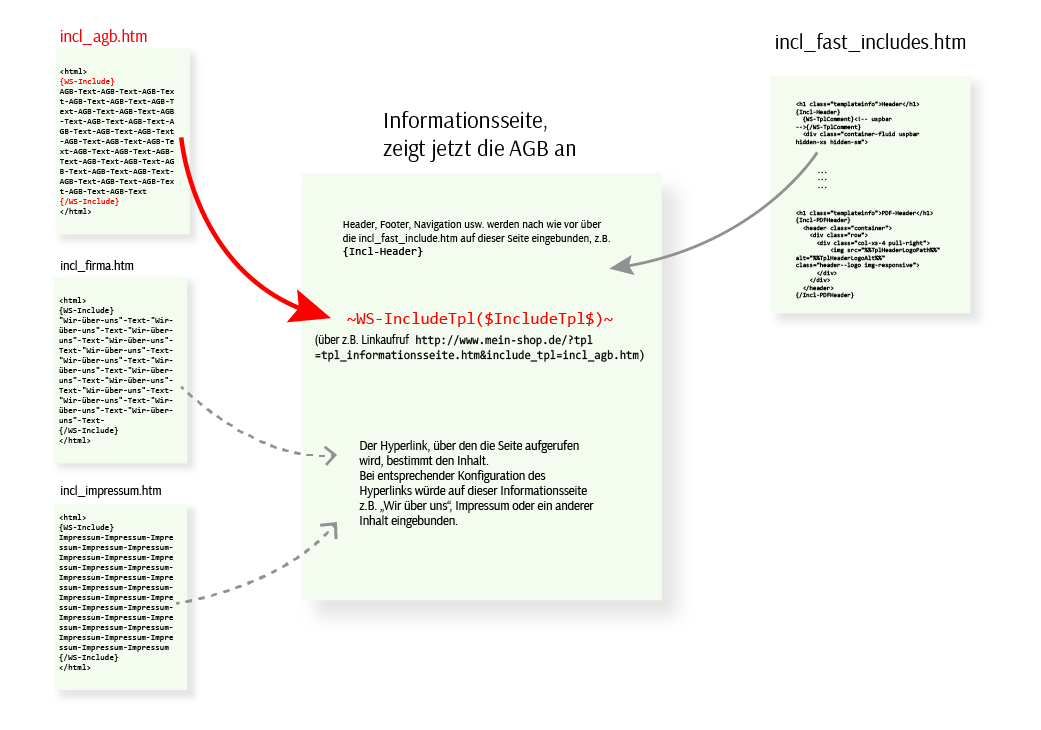
Static usage requires a separate template per piece of content, that is, one each for withdrawal, terms and conditions, and imprint. All three contain the same header, footer, and navigation. Dynamic usage avoids exactly this duplication. You then create only one complete template, a master information page with header, footer, and navigation, but without fixed content. Which content appears is decided by the link that the visitor clicks. The include files remain rudimentary and contain neither header, footer, nor navigation. On the master information pagetpl_informationsseite.htm, the placeholder $IncludeTpl$ is used instead of a fixed file name:
include_tpl parameter. The include files must be located in the same template directory as the master information page.
External includes
External includes embed foreign programs in the shop, for example product configurators, external login systems, or flip catalogs. Usually, such systems are opened via a hyperlink in a new tab or started via frames, iframes, and popups. In all these cases, the visitor initially leaves the shop page. An external include avoids this. The visitor stays in the shop, and additional frames or popups are not needed. In this way, you integrate, for example, the WEBSALE product rating system or the WEBSALE inquiry system “Inquiry4” directly into a shop template. External includes are embedded via tags on any template. Guide: Using external includesFurther references
- Reference: WS-Include
- Reference: WS-IncludeTpl()
- Reference: WS-DynIncludeTpl()
- Reference: WS-ExternInclude()