
Prerequisites
For all AJAX integrations you need the WEBSALE JavaScript system library together with its design component, at least in version 1.8.1. The system library brings the AJAX functions with it. In the design component you store your own reactions to success and errors. Guide: JavaScript and jQuery Materials: WEBSALE JavaScript libraryIf you use the tracking interface together with AJAX, follow the notes on AJAX-based functions in the tracking documentation. Since a full page build does not take place with an AJAX call, tracking calls otherwise do not take effect.Guide: Description of the tracking interface
How an AJAX call works
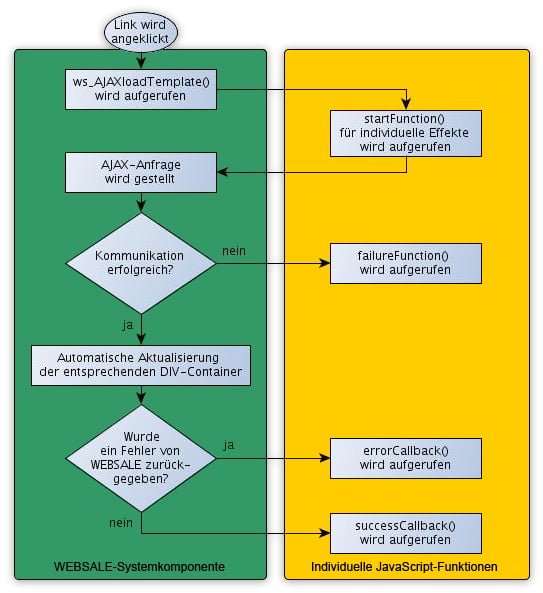
Before you build the first link, it is worth taking a look at the flow. It is the same for content and forms and explains why you specify four JavaScript functions.- The customer clicks on a link or a button. The called function suppresses the normal page navigation.
- Before the request is sent, the
startFunctionruns. Here you typically show a layer with a loading graphic. - The request goes to WEBSALE V8s. The requested template is generated there and returned.
- If no response is received, for example because the internet connection dropped or a timeout occurs, the
failureFunctionruns. - If a response comes back, its content decides: on success, the
successCallbackruns; if WEBSALE V8s reports an error instead, theerrorCallbackruns. - On success, the system library automatically inserts the returned content into the display areas of your page.
failureFunction and errorCallback is important for your error messages. The failureFunction stands for a communication error where the shop did not respond at all. The errorCallback stands for a response from the shop that reports an error, for example a template that was not found.
The requested content is fetched via the WS-LoadTpl tag, possibly in combination with WS-ExternInclude, FORM-Template, or FORM-SSLTemplate.
Loading content via AJAX
The simpler of the two cases is loading content, for example an information page behind a tab. It consists of four steps: build the link, include the library, create the display area, prepare the target template.Step 1: Create the link
The link calls thews_AJAXloadTemplate function. The return in front prevents the browser from additionally following the link.
Step 2: Include the system library and design component
Include the system library together with its design component. If you have already done so, check the version.Step 3: Define display areas
On the template with the link, create one or more display areas. The loaded content is inserted into them. Use any HTML element with an ID. The ID is the connection to the target template and must therefore be unique.Step 4: Create WS-Ajax sections in the target template
WEBSALE V8s returns the template that the link calls. So that the system library knows which part of it belongs where, you divide the target template into WS-Ajax sections. The section name consists of the prefixWS-Ajax- and the ID of the display area. This way, you can exchange several areas at the same time with a single call.
ST-Ajax. Without this bracketing, the markers would appear visibly in the source code on a normal call.
Loading and submitting forms via AJAX
A form goes through the same flow, but twice: once when the form is loaded and once when it is submitted. There is a separate function for submitting because the field contents are sent along. The result of the submission depends on the input. If it is faulty, WEBSALE V8s returns the form again, together with error messages. If it was valid, the confirmation page of the form comes back. In both cases the response ends up in the same display area.Step 1: Load the form via a link
Loading the form is no different from loading a piece of content.Step 2: Adapt the form and submit button
Integrate yourform element as usual and assign an ID. Via this ID the function finds the field contents on submission. On the submit button, add the call to ws_AJAXsendFormTemplate.
Step 3: Extend the design component
Include the system library together with its design component and add the same four functions there as for loading content. Both calls can share the same functions or use their own.Step 4: Define the display area
On the template that is to receive the form, create a display area with an ID.Step 5: Create a WS-Ajax section
Wrap the form template with a WS-Ajax section whose name ends with the ID of the display area.ST-Ajax. Also remember the button: without AJAX it must not carry the function call, otherwise the form would not be submitted at all.
Syntax of the functions
Both functions expect the same parameters, only the first one differs. When loading, it is the link; when submitting, it is the ID of the form. Pay attention to the quotation marks:startFunction and failureFunction are passed as function objects, that is, without quotation marks and without parentheses. successCallback and errorCallback, on the other hand, are passed as strings containing the complete function call including parentheses.
ws_AJAXloadTemplate
Reference: WS-Charset
ws_AJAXsendFormTemplate
Possible integrations with AJAX
The following content and features can be integrated via AJAX with the functions described. The respective pages show the integration using a concrete example, together with the function names used there.- Loading information pages via AJAX
- Loading and submitting forms via AJAX
- Quick login for existing customers