
Creating the file
The global.config is located in the online service area in the “Configuration” service directly under “Global”. To create it, click the “create new configuration” icon to the right of the word “Configurations” and name the new configuration global. The system adds the file extension itself.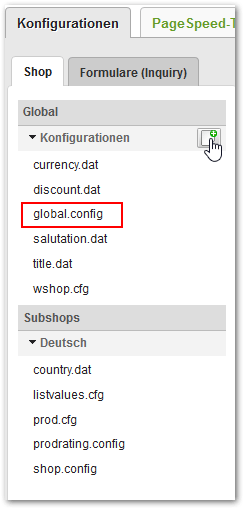
Who reads the file
The global.config is not only evaluated by the shop system itself. Depending on the section, a different program reads it, which explains why some changes take effect immediately and others only with the next run of a background program.The shop system reads the global.config as needed within a page request. Changes to the sections that the shop system evaluates therefore take effect immediately. The sections for imports, analyses and voucher management are only read on the next run of the respective program or the next time the respective page is opened in the service area.
Common
This section collects individual basic settings that do not belong to a section of their own.FORMTagsResetInputCounter is mainly useful on pages that preload product data dynamically, for example via CAT-AdvData or CAT-LoadData. If there are several product forms on one page, the sequentially assigned field names can overlap and inputs can be assigned to the wrong form. With test, you first activate the change only in the shop’s test mode and check the effect before switching to yes.Conversions
Determines whether the additional inputs for products are passed hex-encoded into the order data. This is necessary if the inputs can contain characters that interfere with the format of the order data, for example line breaks.There are exactly 20 additional input fields per product, which is why the series ends at 20. An individually set parameter always wins, even if it says
none and the default is hex. Any value other than hex is read as none.The encoded values appear in the order data in the
ExtraInput_<Nummer> block of the respective item. The receiving merchandise management system must know the encoding and reverse it.ProductDataFieldInjection
Sets product data fields for test scenarios without the data from the merchandise management system having to be changed. This lets you add, overwrite or clear product information at short notice.Subsection +InjectData
Each+InjectData subsection describes a rule. You can create as many of them as you like.
Subsection +SetData
Within+InjectData, you use any number of +SetData subsections to define which fields receive which value.
Patterns for ProductPattern-List
PN: checks the product number, PI: the product index. As wildcards, * stands for any number of characters and ? for exactly one character.The section is only evaluated if the function is enabled for the shop. If it is not, the shop system logs an error and skips the entire section. You can get it enabled through your WEBSALE contact.
SpecialUserCodes
Automatically fills suffix fields of the billing address when the customer enters a predefined code or arrives in the shop via a link with the matching parameter. This lets you assign customers to a customer group or a sales channel during registration, for example. The customer only enters a readable alias. Which technical value results from it is defined exclusively in this configuration and is neither visible to nor changeable by the customer.XXL, suffix field 13 of the billing address then contains the value gold.
The comparison of the input is not case-sensitive. An entry with
+Input = XXL therefore also matches the input xxl. A second +Input line for the same spelling in different capitalization is unnecessary. You only need several +Input lines for genuinely different aliases.The function only works for logged-in customers. On a match, the shop system writes the value to the billing address and saves it. If the address check or saving fails, all suffix values set in this request are reverted.
SUC- tag family is available for the input field and the feedback in the template.
SpecialW2PConditions
Determines under which conditions a product marked as “conditionally web-to-print-capable” is actually web-to-print-capable. Suffix fields of the customer’s billing address are checked.Values for Type
The following example makes a conditionally web-to-print-capable product available as soon as one of the two fields
Suffix15 or Suffix16 of the billing address is filled.
The conditions are read from the configuration on every page request, regardless of whether there is a conditionally web-to-print-capable product in the basket at all. Keep the section short for this reason. Coordinate the setup with your WEBSALE contact.
SubShopMapping
Combines subshops into groups and determines how products and categories are mapped to each other between the subshops of a group. The automatic generation of the hreflang attributes, for example, builds on this.Coordinate the paths to the mapping lists with WEBSALE technical staff so that the files are in the expected location and are read at the right time.
TopSeller
Controls two functions that share the section but are independent of each other: sorting by top sellers and the “Top 30 products” function.The analysis runs in a background program. A changed setting only takes effect the next time this program runs and rebuilds the table.
ChargeLabel
Determines whether a label must be specified when creating a voucher batch.
Guide: Creating and importing vouchers
ChargeLabelValues
Fills the selection list from which the label is chosen when creating a voucher or a voucher batch.
Guide: Creating and importing vouchers
VoucherNumberCharacters
Excludes individual characters from the automatic generation of voucher numbers. This is useful for characters that are easily confused when typing, for example1 and I.
The voucher generator only uses part of the alphabet anyway. The digit
0 and the letters O, W and X do not appear in generated voucher numbers. Excluding these characters therefore changes nothing. So the risk of confusing 0 and O does not exist for generated numbers at all.The setting applies platform-wide to all shops and subshops. It only affects automatically generated numbers. A manually assigned voucher number is not restricted by it.
Sections for imports and third-party systems
These sections belong to interfaces and are not read by the shop system but by the respective import programs. The full description of the parameters is in the interface documentation.CustomerImportPro
Concerns the customer import, in particular the conversion of character sets.ProductImportPro
Concerns the product import, including the conversion of character sets.ImportCharsetConvertMap
Defines the character set conversion table for the imports. The section can occur several times and is therefore written with a plus sign.FuturaECS
Concerns exclusively the Futura merchandise management system.You can find the description of the remaining parameters of these sections in the interface documentation at https://doku.websale.de/schnittstellen.
Further sections
The shop system evaluates four further sections in the global.config that are not described in the previous documentation. They belong to functions that are enabled separately and set up together with WEBSALE.TaxCases
Defines country groups to which the tax case interface refers. The groups are formed in two subsections, once by delivery country and once by country of production.PaymentBruteForceProtection
Blocks payment methods after repeatedly failed payment attempts, separately per session and per IP address, and can additionally enforce a captcha.
An entry in the block time list consists of the number of failed attempts and the block duration in seconds, both in round brackets and separated by a colon. Several entries are strung together.
The entry with the highest threshold reached always applies. A block duration of more than 48 hours is shortened to 48 hours. The value
permanent only takes effect in the session list. An IP address is never blocked permanently, even if permanent is configured.