
wsautoexpdelcost.cfg configuration contains the shipping costs that the DataFlow Manager writes to the data feed. In the DataFlow Manager template, the PR-DeliveryCosts tag outputs these values.
The file is created automatically as soon as the standard output has generated the data feed once and the shipping costs have been configured directly in the DataFlow Manager. You don’t create it manually.
Reference: shop.config, shipping and delivery · Basics: Configuration basics
Where the values are maintained
You maintain the values in the Online Service Area, not in the file. Go to the DataFlow Manager, open the feed you want, and switch to the “Zusätzliche Felder” (additional fields) tab.

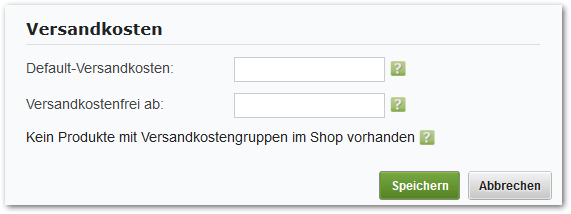
wsautoexpdelcost.cfg, which you can view in the Online Service Area under the configurations.
Where the file is located
The file is located in the subshop’s configuration directory:Structure
The DataFlow Manager rewrites the file completely when saving. It consists of a general section and one section per shipping cost group.
The
costgroup section can occur any number of times. The DataFlow Manager skips groups without a name when saving.
How the shipping costs per product are determined
The export checks four rules, in this order:- If the product has a shipping cost group and this group has a
costassigned, this value applies. - If this yields nothing,
defaultcostapplies. - If
defdelcostfreeis also set and the product price reaches this value, the DataFlow Manager exports0. - If the product has the “versandkostenfrei” (free shipping) flag, it exports
0. This rule overrides all previous ones.
For the comparison with
defdelcostfree, the DataFlow Manager first converts the product price to the gross value. So enter the threshold as a gross amount.Where the shipping cost groups come from
The list of groups offered in the dialog doesn’t come from this file. The DataFlow Manager determines it depending on the type of data connection:
So with the second method, a group that doesn’t occur in any product won’t appear in the dialog at all.
Customizations
You set the normal values, that is, the costs per group as well asdefaultcost and defdelcostfree, in the “Voreinstellung” dialog. You don’t need to touch the file for this.