
Conventional localization (not recommended)
All texts contained in templates and configurations are copied out and passed on for translation in tabular form. Afterwards, all edited texts must be manually reinserted into the individual templates and configurations for each respective language. In practice, this approach turns out to be very time-consuming and labor-intensive. When copying into and out of different documents, encoding errors can also occur. These are caused by different country codepages, by platform-specific codepage deviations (for example between Windows and Mac systems), and by the accidental use of different internet codepages. In addition, this procedure requires coordination between designer, translator, and merchant.Text maintenance via the Textpflege platform (recommended)
By contrast, the Textpflege platform in the Online-Servicebereich of WEBSALE V8s offers a much more efficient way to localize a shop. The coordination effort with the text maintainer or translator is almost entirely eliminated. In addition, it is ensured that the copywriter or translator always automatically uses the correct internet codepage, which can be defined individually for each subshop in the shop configurationshop.config.
To ensure that the translation process runs without disrupting the production system, the respective responsible parties (shop designer, translator, and merchant) must take care to transfer the translations into the associated subshops in an automated manner at suitable points in time.
Each person authorized to maintain texts or to translate gets access to all the texts to be edited. On the user interface of the Textpflege platform, color markings indicate which text elements have already been translated and which still need to be worked on.
The “Textpflege” service in the Online-Servicebereich allows you to use variables in your templates. Instead of entering the same plain text on multiple templates, you create a variable for the relevant text in Textpflege and insert it in the appropriate places in the templates. If you want to change the text, you don’t need to remember everywhere in the shop this text appears — you only need to assign the new text to the corresponding variable.
Guide: Comparison: Textpflege and ws-customer area
Procedure with the Textpflege platform
The following three steps describe the path from the plain texts in the templates to the translated subshop.Step 1: replace texts with variables
The decision whether to work with the WEBSALE Textpflege platform or not determines which template directory you work in. If you use the Textpflege platform, you edit your templates exclusively in the translation template directorybenutzer/templates/translation, i.e. on the source templates that contain the variables. If you do not use the Textpflege platform, you always work in the subshop template directory benutzer/templates/<Subshop-ID>.
Basics: Template directories
In the templates supplied with WEBSALE V8s, variables have already been defined for all texts and are stored in the Textpflege platform. Text variables have the following syntax:
Software version without text variables
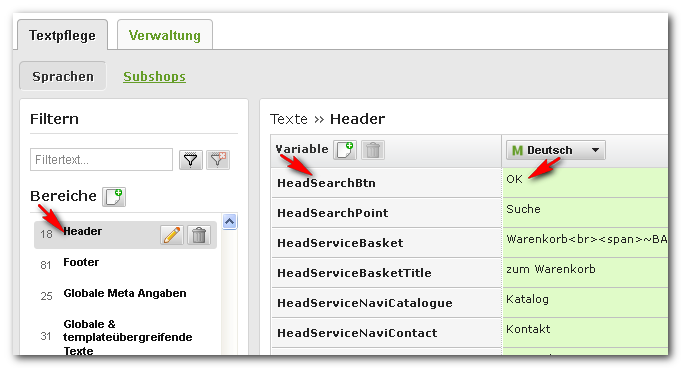
If you are working with an earlier version of the WEBSALE shop software in which all texts are only contained as plain text, you must first “extract” them. This applies to every single text from HTML files and configurations, as well as button labels and similar elements. An extracted text is replaced by the designer with a text variable. Each text variable is created in the Textpflege administration and the corresponding extracted text is assigned to that variable. In doing so, the variable name is created in the Textpflege service without the leading and trailing%%.
Here is an example for button labels:
Step 2: generating the templates usable in the shop
Once all variables and their German texts are assigned, the German HTML templates and other content (for example mail templates and configurations) can be generated from them and checked for errors.Configurations are made directly via the
Konfiguration <Subshop-Name> service in the Online-Servicebereich. There, the variables are inserted and the transfer to the affected subshops (“translation”) is triggered.Step 3: translating into new languages and maintaining texts
To translate the content into other languages, use the “Textpflege” service in the Online-Servicebereich.Importing language files
To import language files, use the “Textpflege administration” service in the Online-Servicebereich. Under the “Administration” tab, a bar with various buttons appears on mouse-over, including the “Import language texts” button: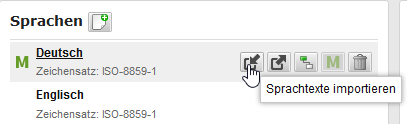
When importing language files into Textpflege, note that the source file must have the following properties:
- Encoding in UTF-8
- CSV format
- TAB-separated