Recurring error messages and anomalies in the shop, their cause, and what helps.
This page collects messages and anomalies that occur again and again and explains the cause of each. The entries are named after the message that the buyer or you get to see.If the problem persists or is not listed here, WEBSALE support can help.
The buyer searches for something, opens a product from the result list, and then clicks the browser’s Back button. Instead of the result list, “Document expired” appears.
The result list is the result of a submitted form. Browsers do not simply display such a page again when going back, because they would have to resend the submitted data to do so. For a search term, that would be harmless; for a sign-in form or an order, it would not. That is why the browser prefers to ask or refuses to display the page.So this is not an error of the shop but a protective measure of the browser. The buyer can get to the list via the “Try again” button in the message.
Change the FORM-Search and FORM-QuickSearch forms to method="get". The search term is then in the address, there is nothing to resend, and the message no longer appears.
<form action="~FORM-Search~" method="get">
Change only the search forms. With method="get", the data is in the address, and its length is limited. That is enough for a search term, but not for address data, comments, and inquiries. Forms with file upload must use method="post" anyway.The opposite applies to the forms of the filter and sort functions, see the next section. Check which form you are dealing with before you change anything.
If you have built your own Back button into the shop that triggers the browser’s back step, the same message appears. A button that links to a known address instead of the browser history does not have this problem.Reference: FORM-Search · FORM-QuickSearch
If this error occurs after basic link optimization has been switched on, check the form of the filter and sort functions. It must contain method="post".
<form action="~FORM-Search~" method="post">
Here, exactly the opposite of the previous section applies. The two cases concern different forms:
Form
Method
Search field, FORM-Search and FORM-QuickSearch
get
Filter and sorting with basic link optimization switched on
post
If you want to keep the sorting and also have shareable addresses, there is no way around post when basic link optimization is switched on.
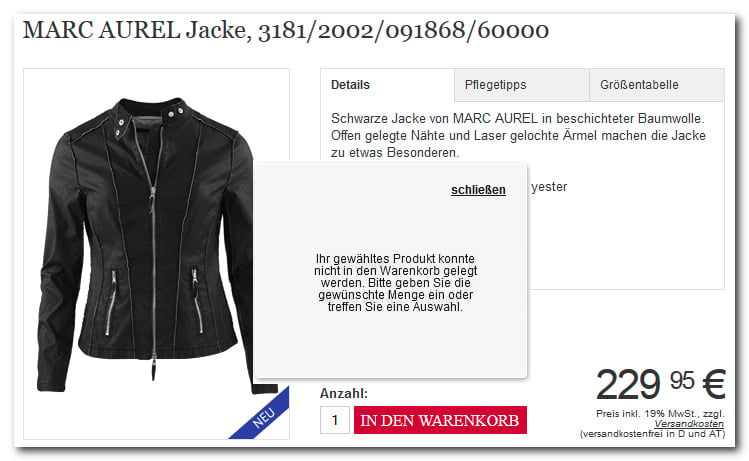
“Your selected product could not be added to the basket”
The complete message reads: “Your selected product could not be added to the basket. Please enter the desired quantity or make a selection.”It appears even though the buyer has selected the variant and quantity.
The quantity input field is assigned a sequential parameter via PR-Quantity_Input. This allows several products in a list to be ordered with one click.If a product list is placed before the PR-Data area on the product detail view, this list increments the parameter. The actual product then no longer gets the number expected for a single product, and the assignment fails.This arrangement leads to the error:
The browser reports that it has blocked a component embedded via http:// in a page delivered via https://. Such components could be read or modified in transit, which is why the browser does not load them.Search the source code of the page for http:// and change the affected embeds to https://. This applies equally to scripts, stylesheets, images, and dynamically loaded content.If the message occurs in connection with the FACT-Finder suggest layer, first check whether this function is activated for your shop.Guide: Integration of the FACT-Finder search function
“Bitte vermeiden Sie Doppelklicks. Please avoid double clicks!”
On the order overview page ws_place_order.htm, WEBSALE V8s automatically generates a script that intercepts a double click on the order button. This message is part of it.This is not an error but a safeguard. Without it, a double click would submit the order twice.The behavior cannot be switched off. Therefore, design the order button so that it reacts visibly after the first click, for example with a loading indicator. Then the double click does not happen in the first place.
The cause lies in the order. It is recommended to include the script below the display area within body.If the script is in the head, widget.render() is called before the display area exists. In that case, it helps to delay the call until the document has loaded completely.Guide: Integration of econda Cross Sell
{"docsConfig":{"theme":"mint","$schema":"https://mintlify.com/docs.json","name":"WEBSALE Dokumentation","description":"Offizielle Dokumentation der E-Commerce-Plattform WEBSALE der WEBSALE AG. Sie umfasst Template-Engine, Shopkonfiguration, Admin-Interface, Schnittstellen, Strapi CMS und WEBSALE | search für die aktuelle Generation sowie für Version V8s.","colors":{"primary":"#0066CC"},"logo":{"light":"https://mintcdn.com/websaleag-44ee7ea6/yeKhhJTjoXWEQCsc/logo/Logo_WEBSALE_2024_Farbverlauf_RGB.png?fit=max\u0026auto=format\u0026n=yeKhhJTjoXWEQCsc\u0026q=85\u0026s=b96a564fcbb0d782bfeb7df19423835e","dark":"https://mintcdn.com/websaleag-44ee7ea6/yeKhhJTjoXWEQCsc/logo/Logo_WEBSALE_2024_Farbverlauf_RGB.png?fit=max\u0026auto=format\u0026n=yeKhhJTjoXWEQCsc\u0026q=85\u0026s=b96a564fcbb0d782bfeb7df19423835e","href":"/"},"favicon":"https://mintcdn.com/websaleag-44ee7ea6/yeKhhJTjoXWEQCsc/logo/favicon.ico?fit=max\u0026auto=format\u0026n=yeKhhJTjoXWEQCsc\u0026q=85\u0026s=5d387abffbbbc1811401ecb3afd2a807","footer":{"socials":{"linkedin":"https://www.linkedin.com/company/websale-ag"},"links":[{"items":[{"label":"Impressum","href":"https://websale.de/impressum"},{"label":"Datenschutz","href":"https://websale.de/datenschutz"}]}]},"search":{"prompt":"Durchsuchen"},"fonts":{"family":"Inter"},"styling":{"codeblocks":{"theme":{"light":"github-light","dark":"github-dark"},"languages":{"custom":["/languages/websale.json"]}},"latex":true},"navigation":{"languages":[{"language":"de","href":""},{"language":"en","href":"en"}]}},"deployment":{"deploymentMetadataValue":{"subdomain":"websaleag-44ee7ea6","hasAudioNarration":false,"actualSubdomain":"websaleag-44ee7ea6","customDomains":["dokumentation.websale.de"],"gitSource":{"type":"gitlab","owner":"websale-ag-group","repo":"dokumentation","deployBranch":"main","contentDirectory":"","isPrivate":false,"projectId":83013579,"mountPath":"","label":""},"chroma":{"liveDeploymentHistoryId":"6aeb9d52b68579879703242b","collectionId":"880d3256-45c3-441d-ae9d-914252efd9ff","schemaVersion":"v3","latestBuiltDeploymentHistoryId":"6aeb9d52b68579879703242b"},"feedback":{"thumbs":true,"agentFeedback":true},"entitlements":{"AI_CHAT":{"status":"ENABLED"},"WEB_MCP":{"status":"ENABLED"},"NARRATION":{"status":"ENABLED"}},"buildId":"6aed931e01ea23d695418b6d","clientVersion":"0.0.4074","searchFilterCounts":[{"language":"de","tag":"Version V8s","count":563},{"language":"de","tag":"Wegweiser","count":546},{"language":"de","tag":"Referenz","count":326},{"language":"en","tag":"Reference","count":326},{"language":"en","tag":"Version V8s","count":325},{"language":"en","tag":"Guide","count":248},{"language":"de","tag":"Neue Generation","count":245},{"language":"en","tag":"New generation","count":245},{"language":"de","tag":"Schnittstellen","count":174},{"language":"de","tag":"Tags","count":132},{"language":"en","tag":"Tags","count":132},{"language":"de","tag":"Frontend","count":93},{"language":"en","tag":"Frontend","count":93},{"language":"de","tag":"Konfiguration","count":76},{"language":"en","tag":"Configuration","count":76},{"language":"de","tag":"Bestellprozess","count":61},{"language":"en","tag":"Interfaces","count":60},{"language":"de","tag":"Materialien","count":58},{"language":"en","tag":"Reference – Modules","count":39},{"language":"en","tag":"Admin Interface API","count":36}],"searchSettings":{"isFiltersEnabled":true,"showContentSnippets":true}},"assistantConfig":{"enableAskAiButton":false,"enableStarterQuestions":false,"enableContextualStarterQuestions":false,"enableAskAiSearchBar":true,"deflection":{"enabled":true,"email":"support@websale.de","showHelpButton":false}},"basePath":"","hasChatPermissions":true,"hasWebMcpPermissions":true,"toggles":[{"name":"kill-isr","enabled":true,"variant":{"name":"disabled","enabled":false,"feature_enabled":true},"impressionData":false},{"name":"agent-mintlify-slack","enabled":true,"variant":{"name":"disabled","enabled":false,"feature_enabled":true},"impressionData":false},{"name":"agent-integrations-settings","enabled":true,"variant":{"name":"disabled","enabled":false,"feature_enabled":true},"impressionData":false},{"name":"rbac-expansion","enabled":true,"variant":{"name":"disabled","enabled":false,"feature_enabled":true},"impressionData":false},{"name":"automations-pr-grouping","enabled":true,"variant":{"name":"disabled","enabled":false,"feature_enabled":true},"impressionData":false},{"name":"custom-prefix","enabled":true,"variant":{"name":"disabled","enabled":false,"feature_enabled":true},"impressionData":false},{"name":"analytics-v7","enabled":true,"variant":{"name":"disabled","enabled":false,"feature_enabled":true},"impressionData":false},{"name":"user-flows-analytics","enabled":true,"variant":{"name":"disabled","enabled":false,"feature_enabled":true},"impressionData":false},{"name":"no-publish-flow","enabled":true,"variant":{"name":"disabled","enabled":false,"feature_enabled":true},"impressionData":false},{"name":"workos-onboarding","enabled":true,"variant":{"name":"disabled","enabled":false,"feature_enabled":true},"impressionData":false},{"name":"llms-txt-v2","enabled":true,"variant":{"name":"disabled","enabled":false,"feature_enabled":true},"impressionData":false},{"name":"snapshot-serving-live","enabled":true,"variant":{"name":"disabled","enabled":false,"feature_enabled":true},"impressionData":false},{"name":"stripTemperatureMiddleware","enabled":true,"variant":{"name":"disabled","enabled":false,"feature_enabled":true},"impressionData":false},{"name":"support-platform-pylon-zendesk","enabled":true,"variant":{"name":"disabled","enabled":false,"feature_enabled":true},"impressionData":false},{"name":"snapshot-serving","enabled":true,"variant":{"name":"disabled","enabled":false,"feature_enabled":true},"impressionData":false},{"name":"instant-rollback","enabled":true,"variant":{"name":"disabled","enabled":false,"feature_enabled":true},"impressionData":false},{"name":"granular-notifications-server","enabled":true,"variant":{"name":"disabled","enabled":false,"feature_enabled":true},"impressionData":false},{"name":"granular-notifications","enabled":true,"variant":{"name":"disabled","enabled":false,"feature_enabled":true},"impressionData":false},{"name":"automations-fable","enabled":true,"variant":{"name":"disabled","enabled":false,"feature_enabled":true},"impressionData":false},{"name":"fixed-ai-action-pricing","enabled":true,"variant":{"name":"disabled","enabled":false,"feature_enabled":true},"impressionData":false},{"name":"automation-resolve-merge-conflict","enabled":true,"variant":{"name":"disabled","enabled":false,"feature_enabled":true},"impressionData":false},{"name":"scoped-publishing","enabled":true,"variant":{"name":"disabled","enabled":false,"feature_enabled":true},"impressionData":false},{"name":"mintql","enabled":true,"variant":{"name":"disabled","enabled":false,"feature_enabled":true},"impressionData":false},{"name":"page-level-analytics","enabled":true,"variant":{"name":"disabled","enabled":false,"feature_enabled":true},"impressionData":false},{"name":"editor-version-history-v2","enabled":true,"variant":{"name":"disabled","enabled":false,"feature_enabled":true},"impressionData":false},{"name":"billing-page-v2","enabled":true,"variant":{"name":"disabled","enabled":false,"feature_enabled":true},"impressionData":false},{"name":"full-page-search","enabled":true,"variant":{"name":"disabled","enabled":false,"feature_enabled":true},"impressionData":false},{"name":"workspace-projects","enabled":true,"variant":{"name":"disabled","enabled":false,"feature_enabled":true},"impressionData":false},{"name":"assistant-v5","enabled":true,"variant":{"name":"disabled","enabled":false,"feature_enabled":true},"impressionData":false},{"name":"fork-pr-previews","enabled":true,"variant":{"name":"disabled","enabled":false,"feature_enabled":true},"impressionData":false},{"name":"revalidation-jwt","enabled":true,"variant":{"name":"disabled","enabled":false,"feature_enabled":true},"impressionData":false},{"name":"vite-origin","enabled":true,"variant":{"name":"disabled","enabled":false,"feature_enabled":true},"impressionData":false},{"name":"workos-sso-scim","enabled":true,"variant":{"name":"disabled","enabled":false,"feature_enabled":true},"impressionData":false},{"name":"hobby-abuse-scan","enabled":true,"variant":{"name":"disabled","enabled":false,"feature_enabled":true},"impressionData":false},{"name":"dashboard-inbox","enabled":true,"variant":{"name":"disabled","enabled":false,"feature_enabled":true},"impressionData":false},{"name":"workos-signup","enabled":true,"variant":{"name":"disabled","enabled":false,"feature_enabled":true},"impressionData":false},{"name":"turbopuffer-dual-write","enabled":true,"variant":{"name":"disabled","enabled":false,"feature_enabled":true},"impressionData":false},{"name":"workos-enabled","enabled":true,"variant":{"name":"disabled","enabled":false,"feature_enabled":true},"impressionData":false},{"name":"approve-review-flow","enabled":true,"variant":{"name":"disabled","enabled":false,"feature_enabled":true},"impressionData":false},{"name":"sso-setup-deadline-banner","enabled":true,"variant":{"name":"disabled","enabled":false,"feature_enabled":true},"impressionData":false},{"name":"turbopuffer-serve","enabled":true,"variant":{"name":"disabled","enabled":false,"feature_enabled":true},"impressionData":false},{"name":"live-agents","enabled":true,"variant":{"name":"disabled","enabled":false,"feature_enabled":true},"impressionData":false},{"name":"comment-mode","enabled":true,"variant":{"name":"disabled","enabled":false,"feature_enabled":true},"impressionData":false}],"googleFontsInlined":false},"customCss":[{"filePath":"style.css","content":"*:has(>[data-component-part=\"products-selector-trigger\"]){flex-shrink:0!important;min-width:fit-content!important}[data-component-part=\"products-selector-trigger\"]{flex-shrink:0!important;overflow:visible!important;max-width:none!important}[data-component-part=\"products-selector-trigger\"]>span{max-width:none!important;overflow:visible!important}"}],"page":{"pagePath":"en/v8s/fehlerbehebung","slug":"/en/v8s/fehlerbehebung","pageMetadata":{"title":"Troubleshooting notes","description":"Recurring error messages and anomalies in the shop, their cause, and what helps.","keywords":["Troubleshooting","Document expired","Mixed content","Double click","Not Found","Running parameter","PR-Quantity_Input"],"href":"/en/v8s/fehlerbehebung"},"description":{"compiledSource":"\"use strict\";\nconst {jsx: _jsx} = arguments[0];\nconst {useMDXComponents: _provideComponents} = arguments[0];\nfunction _createMdxContent(props) {\n const _components = {\n p: \"p\",\n ..._provideComponents(),\n ...props.components\n };\n return _jsx(_components.p, {\n children: \"Recurring error messages and anomalies in the shop, their cause, and what helps.\"\n });\n}\nfunction MDXContent(props = {}) {\n const {wrapper: MDXLayout} = {\n ..._provideComponents(),\n ...props.components\n };\n return MDXLayout ? _jsx(MDXLayout, {\n ...props,\n children: _jsx(_createMdxContent, {\n ...props\n })\n }) : _createMdxContent(props);\n}\nreturn {\n default: MDXContent\n};\n","frontmatter":{},"scope":{}},"pageType":"default","mdx":{"mdxSource":{"compiledSource":"\"use strict\";const{Fragment:_Fragment,jsx:_jsx,jsxs:_jsxs}=arguments[0];const{useMDXComponents:_provideComponents}=arguments[0];function _createMdxContent(props){const _components={a:`a`,code:`code`,li:`li`,p:`p`,pre:`pre`,span:`span`,strong:`strong`,tbody:`tbody`,td:`td`,th:`th`,thead:`thead`,tr:`tr`,ul:`ul`,..._provideComponents(),...props.components},{CodeBlock,Heading,OptimizedImage,Table,Warning}=_components;if(!CodeBlock)_missingMdxReference(`CodeBlock`,true);if(!Heading)_missingMdxReference(`Heading`,true);if(!OptimizedImage)_missingMdxReference(`OptimizedImage`,true);if(!Table)_missingMdxReference(`Table`,true);if(!Warning)_missingMdxReference(`Warning`,true);return _jsxs(_Fragment,{children:[_jsx(_components.p,{children:`This page collects messages and anomalies that occur again and again and explains the cause of each. The entries are named after the message that the buyer or you get to see.`}),`\n`,_jsx(_components.p,{children:`If the problem persists or is not listed here, WEBSALE support can help.`}),`\n`,_jsx(Heading,{level:`2`,id:`dokument-erloschen-nach-einem-klick-auf-zurück`,children:`“Document expired” after clicking Back`}),`\n`,_jsx(_components.p,{children:`The buyer searches for something, opens a product from the result list, and then clicks the browser’s Back button. Instead of the result list, “Document expired” appears.`}),`\n`,_jsx(Heading,{level:`3`,id:`die-ursache`,children:`The cause`}),`\n`,_jsx(_components.p,{children:`The result list is the result of a submitted form. Browsers do not simply display such a page again when going back, because they would have to resend the submitted data to do so. For a search term, that would be harmless; for a sign-in form or an order, it would not. That is why the browser prefers to ask or refuses to display the page.`}),`\n`,_jsx(_components.p,{children:`So this is not an error of the shop but a protective measure of the browser. The buyer can get to the list via the “Try again” button in the message.`}),`\n`,_jsx(Heading,{level:`3`,id:`was-dagegen-hilft`,children:`What helps`}),`\n`,_jsxs(_components.p,{children:[`Change the `,_jsx(_components.code,{children:`FORM-Search`}),` and `,_jsx(_components.code,{children:`FORM-QuickSearch`}),` forms to `,_jsx(_components.code,{children:`method=\"get\"`}),`. The search term is then in the address, there is nothing to resend, and the message no longer appears.`]}),`\n`,_jsx(CodeBlock,{filename:``,numberOfLines:`1`,language:`html`,children:_jsx(_components.pre,{className:`shiki shiki-themes github-light github-dark`,style:{backgroundColor:`#fff`,\"--shiki-dark-bg\":`#24292e`,color:`#24292e`,\"--shiki-dark\":`#e1e4e8`},language:`html`,children:_jsxs(_components.code,{language:`html`,numberOfLines:`1`,children:[_jsxs(_components.span,{className:`line`,children:[_jsx(_components.span,{style:{color:`#24292E`,\"--shiki-dark\":`#E1E4E8`},children:`\u003c`}),_jsx(_components.span,{style:{color:`#22863A`,\"--shiki-dark\":`#85E89D`},children:`form`}),_jsx(_components.span,{style:{color:`#6F42C1`,\"--shiki-dark\":`#B392F0`},children:` action`}),_jsx(_components.span,{style:{color:`#24292E`,\"--shiki-dark\":`#E1E4E8`},children:`=`}),_jsx(_components.span,{style:{color:`#032F62`,\"--shiki-dark\":`#9ECBFF`},children:`\"~FORM-Search~\"`}),_jsx(_components.span,{style:{color:`#6F42C1`,\"--shiki-dark\":`#B392F0`},children:` method`}),_jsx(_components.span,{style:{color:`#24292E`,\"--shiki-dark\":`#E1E4E8`},children:`=`}),_jsx(_components.span,{style:{color:`#032F62`,\"--shiki-dark\":`#9ECBFF`},children:`\"get\"`}),_jsx(_components.span,{style:{color:`#24292E`,\"--shiki-dark\":`#E1E4E8`},children:`>`})]}),`\n`]})})}),`\n`,_jsxs(Warning,{children:[_jsxs(_components.p,{children:[`Change `,_jsx(_components.strong,{children:`only`}),` the search forms. With `,_jsx(_components.code,{children:`method=\"get\"`}),`, the data is in the address, and its length is limited. That is enough for a search term, but not for address data, comments, and inquiries. Forms with file upload must use `,_jsx(_components.code,{children:`method=\"post\"`}),` anyway.`]}),_jsx(_components.p,{children:`The opposite applies to the forms of the filter and sort functions, see the next section. Check which form you are dealing with before you change anything.`})]}),`\n`,_jsx(_components.p,{children:`If you have built your own Back button into the shop that triggers the browser’s back step, the same message appears. A button that links to a known address instead of the browser history does not have this problem.`}),`\n`,_jsxs(_components.p,{children:[`Reference: `,_jsx(_components.a,{href:`/en/v8s/referenz/tags/form-formulare#catalog-search-and-product`,children:`FORM-Search`}),` · `,_jsx(_components.a,{href:`/en/v8s/referenz/tags/form-formulare#catalog-search-and-product`,children:`FORM-QuickSearch`})]}),`\n`,_jsx(Heading,{level:`2`,id:`not-found-beim-filtern-und-sortieren`,children:`“Not Found” when filtering and sorting`}),`\n`,_jsxs(_components.p,{children:[`If this error occurs after basic link optimization has been switched on, check the form of the filter and sort functions. It must contain `,_jsx(_components.code,{children:`method=\"post\"`}),`.`]}),`\n`,_jsx(CodeBlock,{filename:``,numberOfLines:`1`,language:`html`,children:_jsx(_components.pre,{className:`shiki shiki-themes github-light github-dark`,style:{backgroundColor:`#fff`,\"--shiki-dark-bg\":`#24292e`,color:`#24292e`,\"--shiki-dark\":`#e1e4e8`},language:`html`,children:_jsxs(_components.code,{language:`html`,numberOfLines:`1`,children:[_jsxs(_components.span,{className:`line`,children:[_jsx(_components.span,{style:{color:`#24292E`,\"--shiki-dark\":`#E1E4E8`},children:`\u003c`}),_jsx(_components.span,{style:{color:`#22863A`,\"--shiki-dark\":`#85E89D`},children:`form`}),_jsx(_components.span,{style:{color:`#6F42C1`,\"--shiki-dark\":`#B392F0`},children:` action`}),_jsx(_components.span,{style:{color:`#24292E`,\"--shiki-dark\":`#E1E4E8`},children:`=`}),_jsx(_components.span,{style:{color:`#032F62`,\"--shiki-dark\":`#9ECBFF`},children:`\"~FORM-Search~\"`}),_jsx(_components.span,{style:{color:`#6F42C1`,\"--shiki-dark\":`#B392F0`},children:` method`}),_jsx(_components.span,{style:{color:`#24292E`,\"--shiki-dark\":`#E1E4E8`},children:`=`}),_jsx(_components.span,{style:{color:`#032F62`,\"--shiki-dark\":`#9ECBFF`},children:`\"post\"`}),_jsx(_components.span,{style:{color:`#24292E`,\"--shiki-dark\":`#E1E4E8`},children:`>`})]}),`\n`]})})}),`\n`,_jsxs(Warning,{children:[_jsx(_components.p,{children:`Here, exactly the opposite of the previous section applies. The two cases concern different forms:`}),_jsxs(Table,{children:[_jsx(_components.thead,{children:_jsxs(_components.tr,{children:[_jsx(_components.th,{children:`Form`}),_jsx(_components.th,{children:`Method`})]})}),_jsxs(_components.tbody,{children:[_jsxs(_components.tr,{children:[_jsxs(_components.td,{children:[`Search field, `,_jsx(_components.code,{children:`FORM-Search`}),` and `,_jsx(_components.code,{children:`FORM-QuickSearch`})]}),_jsx(_components.td,{children:_jsx(_components.code,{children:`get`})})]}),_jsxs(_components.tr,{children:[_jsx(_components.td,{children:`Filter and sorting with basic link optimization switched on`}),_jsx(_components.td,{children:_jsx(_components.code,{children:`post`})})]})]})]}),_jsxs(_components.p,{children:[`If you want to keep the sorting and also have shareable addresses, there is no way around `,_jsx(_components.code,{children:`post`}),` when basic link optimization is switched on.`]})]}),`\n`,_jsxs(_components.p,{children:[`Guide: `,_jsx(_components.a,{href:`/en/v8s/seo/seo-urls-und-link-optimierung`,children:`SEO URLs and link optimization`})]}),`\n`,_jsx(Heading,{level:`2`,id:`ihr-gewähltes-produkt-konnte-nicht-in-den-warenkorb-gelegt-werden`,children:`“Your selected product could not be added to the basket”`}),`\n`,_jsx(_components.p,{children:`The complete message reads: “Your selected product could not be added to the basket. Please enter the desired quantity or make a selection.”`}),`\n`,_jsx(_components.p,{children:`It appears even though the buyer has selected the variant and quantity.`}),`\n`,_jsx(OptimizedImage,{src:`https://mintcdn.com/websaleag-44ee7ea6/7EOsbAvQZg2u3Pju/images/fehler_produkt_warenkorb.png?fit=max\u0026auto=format\u0026n=7EOsbAvQZg2u3Pju\u0026q=85\u0026s=1e9957eaa09407a6e95200b79fd1ea2b`,alt:`Product basket error`,\"data-og-width\":`749`,width:`749`,\"data-og-height\":`461`,height:`461`,\"data-path\":`images/fehler_produkt_warenkorb.png`,\"data-optimize\":`true`,\"data-opv\":`3`,srcset:`https://mintcdn.com/websaleag-44ee7ea6/7EOsbAvQZg2u3Pju/images/fehler_produkt_warenkorb.png?w=280\u0026fit=max\u0026auto=format\u0026n=7EOsbAvQZg2u3Pju\u0026q=85\u0026s=77cb62ce3aaf326dc835baf50d8cfab9 280w, https://mintcdn.com/websaleag-44ee7ea6/7EOsbAvQZg2u3Pju/images/fehler_produkt_warenkorb.png?w=560\u0026fit=max\u0026auto=format\u0026n=7EOsbAvQZg2u3Pju\u0026q=85\u0026s=669ad22c36e808eeade349357434b3ba 560w, https://mintcdn.com/websaleag-44ee7ea6/7EOsbAvQZg2u3Pju/images/fehler_produkt_warenkorb.png?w=840\u0026fit=max\u0026auto=format\u0026n=7EOsbAvQZg2u3Pju\u0026q=85\u0026s=a12f248aa218115eb7ffe1dad3371aa5 840w, https://mintcdn.com/websaleag-44ee7ea6/7EOsbAvQZg2u3Pju/images/fehler_produkt_warenkorb.png?w=1100\u0026fit=max\u0026auto=format\u0026n=7EOsbAvQZg2u3Pju\u0026q=85\u0026s=c3b79ee727bfae639e969cb10cdfda61 1100w, https://mintcdn.com/websaleag-44ee7ea6/7EOsbAvQZg2u3Pju/images/fehler_produkt_warenkorb.png?w=1650\u0026fit=max\u0026auto=format\u0026n=7EOsbAvQZg2u3Pju\u0026q=85\u0026s=efdad642aed08fca85817be437f4dcec 1650w, https://mintcdn.com/websaleag-44ee7ea6/7EOsbAvQZg2u3Pju/images/fehler_produkt_warenkorb.png?w=2500\u0026fit=max\u0026auto=format\u0026n=7EOsbAvQZg2u3Pju\u0026q=85\u0026s=7b14af125c2b288858403f9d129398e1 2500w`}),`\n`,_jsx(Heading,{level:`3`,id:`die-ursache-2`,children:`The cause`}),`\n`,_jsxs(_components.p,{children:[`The quantity input field is assigned a sequential parameter via `,_jsx(_components.code,{children:`PR-Quantity_Input`}),`. This allows several products in a list to be ordered with one click.`]}),`\n`,_jsxs(_components.p,{children:[`If a product list is placed `,_jsx(_components.strong,{children:`before`}),` the `,_jsx(_components.code,{children:`PR-Data`}),` area on the product detail view, this list increments the parameter. The actual product then no longer gets the number expected for a single product, and the assignment fails.`]}),`\n`,_jsx(_components.p,{children:`This arrangement leads to the error:`}),`\n`,_jsx(CodeBlock,{filename:``,numberOfLines:`10`,language:`html`,children:_jsx(_components.pre,{className:`shiki shiki-themes github-light github-dark`,style:{backgroundColor:`#fff`,\"--shiki-dark-bg\":`#24292e`,color:`#24292e`,\"--shiki-dark\":`#e1e4e8`},language:`html`,children:_jsxs(_components.code,{language:`html`,numberOfLines:`10`,children:[_jsx(_components.span,{className:`line`,children:_jsx(_components.span,{style:{color:`#24292E`,\"--shiki-dark\":`#E1E4E8`},children:`{CAT-AdvData($C-Links,9)}`})}),`\n`,_jsx(_components.span,{className:`line`,children:_jsx(_components.span,{style:{color:`#24292E`,\"--shiki-dark\":`#E1E4E8`},children:` {@PR-Data}`})}),`\n`,_jsx(_components.span,{className:`line`,children:_jsx(_components.span,{style:{color:`#6A737D`,\"--shiki-dark\":`#6A737D`},children:` \u003c!-- Produktliste -->`})}),`\n`,_jsx(_components.span,{className:`line`,children:_jsx(_components.span,{style:{color:`#24292E`,\"--shiki-dark\":`#E1E4E8`},children:` {/@PR-Data}`})}),`\n`,_jsx(_components.span,{className:`line`,children:_jsx(_components.span,{style:{color:`#24292E`,\"--shiki-dark\":`#E1E4E8`},children:`{/CAT-AdvData($C-Links,9)}`})}),`\n`,_jsx(_components.span,{className:`line`}),`\n`,_jsx(_components.span,{className:`line`,children:_jsx(_components.span,{style:{color:`#24292E`,\"--shiki-dark\":`#E1E4E8`},children:`{PR-Data}`})}),`\n`,_jsx(_components.span,{className:`line`,children:_jsx(_components.span,{style:{color:`#24292E`,\"--shiki-dark\":`#E1E4E8`},children:` ~PR-Name~`})}),`\n`,_jsxs(_components.span,{className:`line`,children:[_jsx(_components.span,{style:{color:`#24292E`,\"--shiki-dark\":`#E1E4E8`},children:` \u003c`}),_jsx(_components.span,{style:{color:`#22863A`,\"--shiki-dark\":`#85E89D`},children:`input`}),_jsx(_components.span,{style:{color:`#6F42C1`,\"--shiki-dark\":`#B392F0`},children:` type`}),_jsx(_components.span,{style:{color:`#24292E`,\"--shiki-dark\":`#E1E4E8`},children:`=`}),_jsx(_components.span,{style:{color:`#032F62`,\"--shiki-dark\":`#9ECBFF`},children:`\"text\"`}),_jsx(_components.span,{style:{color:`#6F42C1`,\"--shiki-dark\":`#B392F0`},children:` name`}),_jsx(_components.span,{style:{color:`#24292E`,\"--shiki-dark\":`#E1E4E8`},children:`=`}),_jsx(_components.span,{style:{color:`#032F62`,\"--shiki-dark\":`#9ECBFF`},children:`\"~PR-Quantity_Input~\"`}),_jsx(_components.span,{style:{color:`#6F42C1`,\"--shiki-dark\":`#B392F0`},children:` value`}),_jsx(_components.span,{style:{color:`#24292E`,\"--shiki-dark\":`#E1E4E8`},children:`=`}),_jsx(_components.span,{style:{color:`#032F62`,\"--shiki-dark\":`#9ECBFF`},children:`\"~PR-Quantity~\"`}),_jsx(_components.span,{style:{color:`#24292E`,\"--shiki-dark\":`#E1E4E8`},children:`>`})]}),`\n`,_jsx(_components.span,{className:`line`,children:_jsx(_components.span,{style:{color:`#24292E`,\"--shiki-dark\":`#E1E4E8`},children:`{/PR-Data}`})}),`\n`]})})}),`\n`,_jsx(Heading,{level:`3`,id:`was-dagegen-hilft-2`,children:`What helps`}),`\n`,_jsx(_components.p,{children:`The actual product belongs before every product list:`}),`\n`,_jsx(CodeBlock,{filename:``,numberOfLines:`10`,language:`html`,children:_jsx(_components.pre,{className:`shiki shiki-themes github-light github-dark`,style:{backgroundColor:`#fff`,\"--shiki-dark-bg\":`#24292e`,color:`#24292e`,\"--shiki-dark\":`#e1e4e8`},language:`html`,children:_jsxs(_components.code,{language:`html`,numberOfLines:`10`,children:[_jsx(_components.span,{className:`line`,children:_jsx(_components.span,{style:{color:`#24292E`,\"--shiki-dark\":`#E1E4E8`},children:`{PR-Data}`})}),`\n`,_jsx(_components.span,{className:`line`,children:_jsx(_components.span,{style:{color:`#24292E`,\"--shiki-dark\":`#E1E4E8`},children:` ~PR-Name~`})}),`\n`,_jsxs(_components.span,{className:`line`,children:[_jsx(_components.span,{style:{color:`#24292E`,\"--shiki-dark\":`#E1E4E8`},children:` \u003c`}),_jsx(_components.span,{style:{color:`#22863A`,\"--shiki-dark\":`#85E89D`},children:`input`}),_jsx(_components.span,{style:{color:`#6F42C1`,\"--shiki-dark\":`#B392F0`},children:` type`}),_jsx(_components.span,{style:{color:`#24292E`,\"--shiki-dark\":`#E1E4E8`},children:`=`}),_jsx(_components.span,{style:{color:`#032F62`,\"--shiki-dark\":`#9ECBFF`},children:`\"text\"`}),_jsx(_components.span,{style:{color:`#6F42C1`,\"--shiki-dark\":`#B392F0`},children:` name`}),_jsx(_components.span,{style:{color:`#24292E`,\"--shiki-dark\":`#E1E4E8`},children:`=`}),_jsx(_components.span,{style:{color:`#032F62`,\"--shiki-dark\":`#9ECBFF`},children:`\"~PR-Quantity_Input~\"`}),_jsx(_components.span,{style:{color:`#6F42C1`,\"--shiki-dark\":`#B392F0`},children:` value`}),_jsx(_components.span,{style:{color:`#24292E`,\"--shiki-dark\":`#E1E4E8`},children:`=`}),_jsx(_components.span,{style:{color:`#032F62`,\"--shiki-dark\":`#9ECBFF`},children:`\"~PR-Quantity~\"`}),_jsx(_components.span,{style:{color:`#24292E`,\"--shiki-dark\":`#E1E4E8`},children:`>`})]}),`\n`,_jsx(_components.span,{className:`line`,children:_jsx(_components.span,{style:{color:`#24292E`,\"--shiki-dark\":`#E1E4E8`},children:`{/PR-Data}`})}),`\n`,_jsx(_components.span,{className:`line`}),`\n`,_jsx(_components.span,{className:`line`,children:_jsx(_components.span,{style:{color:`#24292E`,\"--shiki-dark\":`#E1E4E8`},children:`{CAT-AdvData($C-Links,9)}`})}),`\n`,_jsx(_components.span,{className:`line`,children:_jsx(_components.span,{style:{color:`#24292E`,\"--shiki-dark\":`#E1E4E8`},children:` {@PR-Data}`})}),`\n`,_jsx(_components.span,{className:`line`,children:_jsx(_components.span,{style:{color:`#6A737D`,\"--shiki-dark\":`#6A737D`},children:` \u003c!-- Produktliste -->`})}),`\n`,_jsx(_components.span,{className:`line`,children:_jsx(_components.span,{style:{color:`#24292E`,\"--shiki-dark\":`#E1E4E8`},children:` {/@PR-Data}`})}),`\n`,_jsx(_components.span,{className:`line`,children:_jsx(_components.span,{style:{color:`#24292E`,\"--shiki-dark\":`#E1E4E8`},children:`{/CAT-AdvData($C-Links,9)}`})}),`\n`]})})}),`\n`,_jsxs(_components.p,{children:[`For set and grouping products, the list is inside the `,_jsx(_components.code,{children:`PR-Data`}),` area:`]}),`\n`,_jsx(CodeBlock,{filename:``,numberOfLines:`9`,language:`html`,children:_jsx(_components.pre,{className:`shiki shiki-themes github-light github-dark`,style:{backgroundColor:`#fff`,\"--shiki-dark-bg\":`#24292e`,color:`#24292e`,\"--shiki-dark\":`#e1e4e8`},language:`html`,children:_jsxs(_components.code,{language:`html`,numberOfLines:`9`,children:[_jsx(_components.span,{className:`line`,children:_jsx(_components.span,{style:{color:`#24292E`,\"--shiki-dark\":`#E1E4E8`},children:`{PR-Data}`})}),`\n`,_jsx(_components.span,{className:`line`,children:_jsx(_components.span,{style:{color:`#24292E`,\"--shiki-dark\":`#E1E4E8`},children:` ~PR-Name~`})}),`\n`,_jsx(_components.span,{className:`line`}),`\n`,_jsx(_components.span,{className:`line`,children:_jsx(_components.span,{style:{color:`#24292E`,\"--shiki-dark\":`#E1E4E8`},children:` {CAT-AdvData($SetProducts,999)}`})}),`\n`,_jsx(_components.span,{className:`line`,children:_jsx(_components.span,{style:{color:`#24292E`,\"--shiki-dark\":`#E1E4E8`},children:` {@PR-Data}`})}),`\n`,_jsx(_components.span,{className:`line`,children:_jsx(_components.span,{style:{color:`#6A737D`,\"--shiki-dark\":`#6A737D`},children:` \u003c!-- Produktdaten der Setbestandteile -->`})}),`\n`,_jsx(_components.span,{className:`line`,children:_jsx(_components.span,{style:{color:`#24292E`,\"--shiki-dark\":`#E1E4E8`},children:` {/@PR-Data}`})}),`\n`,_jsx(_components.span,{className:`line`,children:_jsx(_components.span,{style:{color:`#24292E`,\"--shiki-dark\":`#E1E4E8`},children:` {/CAT-AdvData($SetProducts,999)}`})}),`\n`,_jsx(_components.span,{className:`line`,children:_jsx(_components.span,{style:{color:`#24292E`,\"--shiki-dark\":`#E1E4E8`},children:`{/PR-Data}`})}),`\n`]})})}),`\n`,_jsx(_components.p,{children:`The sequential parameter cannot be reset. The order in the template is therefore the only lever.`}),`\n`,_jsxs(_components.p,{children:[`Reference: `,_jsx(_components.a,{href:`/en/v8s/referenz/tags/cat/navigation-und-kategoriebaum#cat-advdata`,children:`CAT-AdvData()`}),` · `,_jsx(_components.a,{href:`/en/v8s/referenz/tags/pr/grundlagen-und-produktdaten`,children:`PR-Data`}),` · `,_jsx(_components.a,{href:`/en/v8s/referenz/tags/pr/grundlagen-und-produktdaten`,children:`PR-Quantity_Input`})]}),`\n`,_jsx(Heading,{level:`2`,id:`laden-von-gemischten-aktiven-inhalten-wurde-blockiert`,children:`“Loading mixed active content was blocked”`}),`\n`,_jsxs(_components.p,{children:[`The browser reports that it has blocked a component embedded via `,_jsx(_components.code,{children:`http://`}),` in a page delivered via `,_jsx(_components.code,{children:`https://`}),`. Such components could be read or modified in transit, which is why the browser does not load them.`]}),`\n`,_jsxs(_components.p,{children:[`Search the source code of the page for `,_jsx(_components.code,{children:`http://`}),` and change the affected embeds to `,_jsx(_components.code,{children:`https://`}),`. This applies equally to scripts, stylesheets, images, and dynamically loaded content.`]}),`\n`,_jsx(_components.p,{children:`If the message occurs in connection with the FACT-Finder suggest layer, first check whether this function is activated for your shop.`}),`\n`,_jsxs(_components.p,{children:[`Guide: `,_jsx(_components.a,{href:`/en/v8s/integration-von-fact-finder/integration-von-fact-finder`,children:`Integration of the FACT-Finder search function`})]}),`\n`,_jsx(Heading,{level:`2`,id:`bitte-vermeiden-sie-doppelklicks-please-avoid-double-clicks`,children:`“Bitte vermeiden Sie Doppelklicks. Please avoid double clicks!”`}),`\n`,_jsxs(_components.p,{children:[`On the order overview page `,_jsx(_components.code,{children:`ws_place_order.htm`}),`, WEBSALE V8s automatically generates a script that intercepts a double click on the order button. This message is part of it.`]}),`\n`,_jsx(_components.p,{children:`This is not an error but a safeguard. Without it, a double click would submit the order twice.`}),`\n`,_jsx(_components.p,{children:`The behavior cannot be switched off. Therefore, design the order button so that it reacts visibly after the first click, for example with a loading indicator. Then the double click does not happen in the first place.`}),`\n`,_jsx(Heading,{level:`2`,id:`econda-cross-sell-wird-manchmal-nicht-angezeigt`,children:`Econda Cross Sell is sometimes not displayed`}),`\n`,_jsxs(_components.p,{children:[`The cause lies in the order. It is recommended to include the script `,_jsx(_components.strong,{children:`below`}),` the display area within `,_jsx(_components.code,{children:`body`}),`.`]}),`\n`,_jsxs(_components.p,{children:[`If the script is in the `,_jsx(_components.code,{children:`head`}),`, `,_jsx(_components.code,{children:`widget.render()`}),` is called before the display area exists. In that case, it helps to delay the call until the document has loaded completely.`]}),`\n`,_jsxs(_components.p,{children:[`Guide: `,_jsx(_components.a,{href:`/en/v8s/integration-von-econda/econda-cross-sell`,children:`Integration of econda Cross Sell`})]}),`\n`,_jsx(Heading,{level:`2`,id:`verwandte-themen`,children:`Related topics`}),`\n`,_jsxs(_components.ul,{children:[`\n`,_jsxs(_components.li,{children:[`Guide: `,_jsx(_components.a,{href:`/en/v8s/seo/seo-urls-und-link-optimierung`,children:`SEO URLs and link optimization`})]}),`\n`,_jsxs(_components.li,{children:[`Use case: `,_jsx(_components.a,{href:`/v8s/anwendungsbeispiele/appex-such-und-sortieroptionen-halten`,children:`Keeping sorting and filters across multiple forms`})]}),`\n`,_jsxs(_components.li,{children:[`Guide: `,_jsx(_components.a,{href:`/v8s/warenkorb/produkt-in-warenkorb-legen`,children:`Adding a product to the basket`})]}),`\n`,_jsx(_components.li,{children:`Guide: Integration of econda Cross Sell`}),`\n`]})]})}function MDXContent(props={}){const{wrapper:MDXLayout}={..._provideComponents(),...props.components};return MDXLayout?_jsx(MDXLayout,{...props,children:_jsx(_createMdxContent,{...props})}):_createMdxContent(props)}return{default:MDXContent};function _missingMdxReference(id,component){throw new Error(`Expected `+(component?`component`:`object`)+\" `\"+id+\"` to be defined: you likely forgot to import, pass, or provide it.\")}","frontmatter":{},"scope":{"codeStyling":{"theme":{"light":"github-light","dark":"github-dark"},"languages":{"custom":["/languages/websale.json"]}},"config":{},"pageMetadata":{"title":"Troubleshooting notes","description":"Recurring error messages and anomalies in the shop, their cause, and what helps.","keywords":["Troubleshooting","Document expired","Mixed content","Double click","Not Found","Running parameter","PR-Quantity_Input"],"href":"/en/v8s/fehlerbehebung"}}},"mdxSourceWithNoJs":null},"mdxExtracts":{"tableOfContents":[{"title":"“Document expired” after clicking Back","slug":"dokument-erloschen-nach-einem-klick-auf-zurück","depth":2,"children":[{"title":"The cause","slug":"die-ursache","depth":3,"children":[]},{"title":"What helps","slug":"was-dagegen-hilft","depth":3,"children":[]}]},{"title":"“Not Found” when filtering and sorting","slug":"not-found-beim-filtern-und-sortieren","depth":2,"children":[]},{"title":"“Your selected product could not be added to the basket”","slug":"ihr-gewähltes-produkt-konnte-nicht-in-den-warenkorb-gelegt-werden","depth":2,"children":[{"title":"The cause","slug":"die-ursache-2","depth":3,"children":[]},{"title":"What helps","slug":"was-dagegen-hilft-2","depth":3,"children":[]}]},{"title":"“Loading mixed active content was blocked”","slug":"laden-von-gemischten-aktiven-inhalten-wurde-blockiert","depth":2,"children":[]},{"title":"“Bitte vermeiden Sie Doppelklicks. Please avoid double clicks!”","slug":"bitte-vermeiden-sie-doppelklicks-please-avoid-double-clicks","depth":2,"children":[]},{"title":"Econda Cross Sell is sometimes not displayed","slug":"econda-cross-sell-wird-manchmal-nicht-angezeigt","depth":2,"children":[]},{"title":"Related topics","slug":"verwandte-themen","depth":2,"children":[]}],"codeExamples":{}},"jsLinks":[],"subdomain":"websaleag-44ee7ea6","siteName":"WEBSALE Dokumentation","title":"Troubleshooting notes - WEBSALE Dokumentation","relatedPagesConfig":{"enabled":true,"limit":5,"mode":"automatic"},"navMaps":{"firstHrefInVersion":{},"firstHrefInLanguage":{"de":{"href":"/v8s/fehlerbehebung","matchLevel":1},"en":{"href":"/en/v8s/fehlerbehebung","matchLevel":0}}},"lastModified":"2026-11-06T07:56:47.514Z","originalFileLocation":"en/v8s/fehlerbehebung.mdx","locale":"en"},"headHtml":"\u003cscript data-mint-head>(function(){var d=document.documentElement,p=null;if(!p){try{p=localStorage.getItem(\"isDarkMode\")}catch(e){}if(p==='true')p='dark';else if(p==='false')p='light';if(p!=='light'\u0026\u0026p!=='dark'\u0026\u0026p!=='system')p=\"system\"}var r=p==='system'?(matchMedia(\"(prefers-color-scheme: dark)\").matches?'dark':'light'):p;d.classList.remove(r==='dark'?'light':'dark');d.classList.add(r);d.setAttribute(\"data-theme-preference\",p)})();\u003c/script>\u003cmeta data-mint-head name=\"description\" content=\"Recurring error messages and anomalies in the shop, their cause, and what helps.\">\u003cmeta data-mint-head name=\"application-name\" content=\"WEBSALE Dokumentation\">\u003cmeta data-mint-head name=\"generator\" content=\"Mintlify\">\u003clink data-mint-head rel=\"icon\" type=\"image/png\" sizes=\"192x192\" href=\"/mintlify-assets/_mintlify/favicons/websaleag-44ee7ea6/b-DMHJEWRrC_pLQS/_generated/favicon/android-chrome-192x192.png\" media=\"(prefers-color-scheme: light)\">\u003clink data-mint-head rel=\"apple-touch-icon\" type=\"image/png\" sizes=\"180x180\" href=\"/mintlify-assets/_mintlify/favicons/websaleag-44ee7ea6/b-DMHJEWRrC_pLQS/_generated/favicon/apple-touch-icon.png\">\u003clink data-mint-head rel=\"icon\" type=\"image/png\" sizes=\"16x16\" href=\"/mintlify-assets/_mintlify/favicons/websaleag-44ee7ea6/b-DMHJEWRrC_pLQS/_generated/favicon/favicon-16x16.png\" media=\"(prefers-color-scheme: light)\">\u003clink data-mint-head rel=\"icon\" type=\"image/png\" sizes=\"32x32\" href=\"/mintlify-assets/_mintlify/favicons/websaleag-44ee7ea6/b-DMHJEWRrC_pLQS/_generated/favicon/favicon-32x32.png\" media=\"(prefers-color-scheme: light)\">\u003clink data-mint-head rel=\"shortcut icon\" type=\"image/x-icon\" href=\"/mintlify-assets/_mintlify/favicons/websaleag-44ee7ea6/b-DMHJEWRrC_pLQS/_generated/favicon/favicon.ico\" media=\"(prefers-color-scheme: light)\">\u003clink data-mint-head rel=\"icon\" type=\"image/png\" sizes=\"192x192\" href=\"/mintlify-assets/_mintlify/favicons/websaleag-44ee7ea6/b-DMHJEWRrC_pLQS/_generated/favicon-dark/android-chrome-192x192.png\" media=\"(prefers-color-scheme: dark)\">\u003clink data-mint-head rel=\"icon\" type=\"image/png\" sizes=\"16x16\" href=\"/mintlify-assets/_mintlify/favicons/websaleag-44ee7ea6/b-DMHJEWRrC_pLQS/_generated/favicon-dark/favicon-16x16.png\" media=\"(prefers-color-scheme: dark)\">\u003clink data-mint-head rel=\"icon\" type=\"image/png\" sizes=\"32x32\" href=\"/mintlify-assets/_mintlify/favicons/websaleag-44ee7ea6/b-DMHJEWRrC_pLQS/_generated/favicon-dark/favicon-32x32.png\" media=\"(prefers-color-scheme: dark)\">\u003clink data-mint-head rel=\"shortcut icon\" type=\"image/x-icon\" href=\"/mintlify-assets/_mintlify/favicons/websaleag-44ee7ea6/b-DMHJEWRrC_pLQS/_generated/favicon-dark/favicon.ico\" media=\"(prefers-color-scheme: dark)\">\u003cmeta data-mint-head property=\"og:title\" content=\"Troubleshooting notes - WEBSALE Dokumentation\">\u003cmeta data-mint-head property=\"og:description\" content=\"Recurring error messages and anomalies in the shop, their cause, and what helps.\">\u003cmeta data-mint-head property=\"og:site_name\" content=\"WEBSALE Dokumentation\">\u003cmeta data-mint-head property=\"og:url\" content=\"https://dokumentation.websale.de/en/v8s/fehlerbehebung\">\u003cmeta data-mint-head property=\"og:type\" content=\"website\">\u003cmeta data-mint-head property=\"og:image\" content=\"https://websaleag-44ee7ea6.mintlify.site/_mintlify/api/og/v2?division=Troubleshooting\u0026amp;title=Troubleshooting+notes\u0026amp;description=Recurring+error+messages+and+anomalies+in+the+shop%2C+their+cause%2C+and+what+helps.\u0026amp;theme=2f1e88ce90c5c698bc58bf46\u0026amp;signature=0a9386251a8a9130b216fdc57aa2de9bd22b3879bb83f3009fdc9b9e4df599d5\">\u003cmeta data-mint-head property=\"og:image:width\" content=\"1200\">\u003cmeta data-mint-head property=\"og:image:height\" content=\"630\">\u003cmeta data-mint-head name=\"twitter:card\" content=\"summary_large_image\">\u003cmeta data-mint-head name=\"twitter:title\" content=\"Troubleshooting notes - WEBSALE Dokumentation\">\u003cmeta data-mint-head name=\"twitter:description\" content=\"Recurring error messages and anomalies in the shop, their cause, and what helps.\">\u003cmeta data-mint-head name=\"twitter:image\" content=\"https://websaleag-44ee7ea6.mintlify.site/_mintlify/api/og/v2?division=Troubleshooting\u0026amp;title=Troubleshooting+notes\u0026amp;description=Recurring+error+messages+and+anomalies+in+the+shop%2C+their+cause%2C+and+what+helps.\u0026amp;theme=2f1e88ce90c5c698bc58bf46\u0026amp;signature=0a9386251a8a9130b216fdc57aa2de9bd22b3879bb83f3009fdc9b9e4df599d5\">\u003cmeta data-mint-head name=\"twitter:image:width\" content=\"1200\">\u003cmeta data-mint-head name=\"twitter:image:height\" content=\"630\">\u003cmeta data-mint-head name=\"msapplication-config\" content=\"/mintlify-assets/_mintlify/favicons/websaleag-44ee7ea6/b-DMHJEWRrC_pLQS/_generated/favicon/browserconfig.xml\">\u003cmeta data-mint-head name=\"apple-mobile-web-app-title\" content=\"WEBSALE Dokumentation\">\u003cmeta data-mint-head name=\"msapplication-TileColor\" content=\"#0066CC\">\u003clink data-mint-head rel=\"canonical\" href=\"https://dokumentation.websale.de/en/v8s/fehlerbehebung\">\u003clink data-mint-head rel=\"alternate\" type=\"application/xml\" href=\"/sitemap.xml\">\u003clink data-mint-head rel=\"alternate\" type=\"text/markdown\" href=\"/en/v8s/fehlerbehebung.md\">\u003clink data-mint-head rel=\"alternate\" hreflang=\"en\" href=\"https://dokumentation.websale.de/en/v8s/fehlerbehebung\">\u003clink data-mint-head rel=\"alternate\" hreflang=\"de\" href=\"https://dokumentation.websale.de/v8s/fehlerbehebung\">\u003clink data-mint-head rel=\"alternate\" hreflang=\"x-default\" href=\"https://dokumentation.websale.de/v8s/fehlerbehebung\">\u003cscript data-mint-head type=\"application/ld+json\">{\"@context\":\"https://schema.org\",\"@graph\":[{\"@type\":\"Organization\",\"@id\":\"https://dokumentation.websale.de/#organization\",\"name\":\"WEBSALE Dokumentation\",\"url\":\"https://dokumentation.websale.de\",\"logo\":{\"@type\":\"ImageObject\",\"url\":\"https://mintcdn.com/websaleag-44ee7ea6/yeKhhJTjoXWEQCsc/logo/Logo_WEBSALE_2024_Farbverlauf_RGB.png?fit=max\u0026auto=format\u0026n=yeKhhJTjoXWEQCsc\u0026q=85\u0026s=b96a564fcbb0d782bfeb7df19423835e\"}},{\"@type\":\"WebSite\",\"@id\":\"https://dokumentation.websale.de#website\",\"name\":\"WEBSALE Dokumentation\",\"url\":\"https://dokumentation.websale.de\",\"publisher\":{\"@id\":\"https://dokumentation.websale.de/#organization\"}},{\"@type\":\"WebPage\",\"@id\":\"https://dokumentation.websale.de/en/v8s/fehlerbehebung#webpage\",\"url\":\"https://dokumentation.websale.de/en/v8s/fehlerbehebung\",\"name\":\"Troubleshooting notes\",\"description\":\"Recurring error messages and anomalies in the shop, their cause, and what helps.\",\"dateModified\":\"2026-11-06T07:56:47.514Z\",\"isPartOf\":{\"@id\":\"https://dokumentation.websale.de#website\"},\"breadcrumb\":{\"@id\":\"https://dokumentation.websale.de/en/v8s/fehlerbehebung#breadcrumb\"}},{\"@type\":\"BreadcrumbList\",\"@id\":\"https://dokumentation.websale.de/en/v8s/fehlerbehebung#breadcrumb\",\"itemListElement\":[{\"@type\":\"ListItem\",\"position\":1,\"name\":\"WEBSALE Dokumentation\",\"item\":\"https://dokumentation.websale.de\"},{\"@type\":\"ListItem\",\"position\":2,\"name\":\"Troubleshooting notes\",\"item\":\"https://dokumentation.websale.de/en/v8s/fehlerbehebung\"}]},{\"@type\":[\"Article\",\"TechArticle\"],\"@id\":\"https://dokumentation.websale.de/en/v8s/fehlerbehebung#article\",\"headline\":\"Troubleshooting notes\",\"name\":\"Troubleshooting notes\",\"description\":\"Recurring error messages and anomalies in the shop, their cause, and what helps.\",\"url\":\"https://dokumentation.websale.de/en/v8s/fehlerbehebung\",\"mainEntityOfPage\":{\"@id\":\"https://dokumentation.websale.de/en/v8s/fehlerbehebung#webpage\"},\"dateModified\":\"2026-11-06T07:56:47.514Z\",\"keywords\":\"Troubleshooting, Document expired, Mixed content, Double click, Not Found, Running parameter, PR-Quantity_Input\",\"publisher\":{\"@id\":\"https://dokumentation.websale.de/#organization\"},\"isPartOf\":{\"@id\":\"https://dokumentation.websale.de#website\"}}]}\u003c/script>\u003cscript data-mint-head type=\"application/ld+json\">{\"@context\":\"https://schema.org\",\"@type\":\"WebSite\",\"name\":\"WEBSALE Dokumentation\",\"creator\":{\"@type\":\"Organization\",\"name\":\"Mintlify\",\"url\":\"https://mintlify.com\"}}\u003c/script>","siteName":"WEBSALE Dokumentation","nav":{"global":null,"languages":[{"language":"de","pages":[{"title":"de","href":"/v8s/fehlerbehebung"}]},{"language":"en","products":[{"product":"New generation","icon":"rocket","description":"Current product generation","pages":[{"title":"New generation","href":"/en"}]},{"product":"Version V8s","icon":"clock-rotate-left","description":"Documentation of the WEBSALE V8s generation","tabs":[{"tab":"Basics","groups":[{"group":"WEBSALE V8s","pages":[{"title":"WEBSALE V8s documentation","href":"/en/v8s"}]},{"group":"Basics","pages":[{"title":"How does WEBSALE V8s work?","href":"/en/v8s/wie-funktioniert-websale-v8s"},{"title":"Getting started","href":"/en/v8s/erste-schritte"},{"group":"Configuration basics","pages":[{"title":"Configuration: fundamentals","href":"/en/v8s/grundlagen-konfiguration/konfiguration-grundlagen"},{"title":"Configuration types","href":"/en/v8s/grundlagen-konfiguration/konfigurations-typen"},{"title":"Editing configurations","href":"/en/v8s/grundlagen-konfiguration/bearbeiten-von-konfigurationen"}]},{"title":"Basics of tags","href":"/en/v8s/grundlagen-zu-tags"},{"group":"Template basics","pages":[{"title":"Templates: fundamentals","href":"/en/v8s/grundlagen-templates/templates-grundlagen"},{"title":"Template directories","href":"/en/v8s/grundlagen-templates/template-verzeichnisse"},{"title":"Template master concept","href":"/en/v8s/grundlagen-templates/master-konzept"},{"title":"Comparison: text maintenance and ws-customer area","href":"/en/v8s/grundlagen-templates/vergleich-textpflege-und-ws-customer-bereich"},{"title":"Template types","href":"/en/v8s/grundlagen-templates/template-typen"}]},{"title":"Security concept and data protection","href":"/en/v8s/sicherheitskonzept-und-datenschutz"},{"title":"Basics of texts and languages of a shop","href":"/en/v8s/grundlagen-zu-texten-und-sprachen-eines-shops-textpflege"},{"group":"Working with the online service area","pages":[{"title":"Working with the Online-Servicebereich","href":"/en/v8s/arbeiten-mit-dem-online-servicebereich"},{"title":"General online services","href":"/en/v8s/online-servicebereich/allgemeine-online-dienste"},{"title":"Special online services","href":"/en/v8s/online-servicebereich/spezielle-online-dienste"}]},{"title":"Working with the WSP-Manager","description":"An overview of the WEBSALE Produkt Manager: opening a shop, creating categories and products, adding images and additional fields, and transferring the data to the shop.","href":"/en/v8s/arbeiten-mit-dem-wsp-manager"}]},{"group":"Troubleshooting","pages":[{"title":"Troubleshooting notes","href":"/en/v8s/fehlerbehebung"}]}]},{"tab":"Guide","pages":[{"title":"Guide","href":"/en/v8s/einstellungen/cookies"}]},{"tab":"Reference","pages":[{"title":"Reference","href":"/en/v8s/referenz/tags/a-rechnungsadresse"}]},{"tab":"Materials","pages":[{"title":"Materials","href":"/en/v8s/materialien/fragebogen-kaufmaennische-einstellungen"}]},{"tab":"Use cases","pages":[{"title":"Use cases","href":"/en/v8s/anwendungsbeispiele/anwendungsbeispiele"}]},{"tab":"Interfaces","pages":[{"title":"Interfaces","href":"/en/v8s/schnittstellen"}]}]}]}]},"basePath":"","title":"Troubleshooting notes - WEBSALE Dokumentation","buildId":"dpl_BLQvU86QFwq3AhPofSTw6q8dGWKm","deploymentId":"dpl_BLQvU86QFwq3AhPofSTw6q8dGWKm","dynamics":["a74be98ba7"],"chunks":["zoom-image-lightbox-CLQdF-Ar.js","lightbox-handle-r17bVUz3.js"]}