
DC-FP1 through DC-FP3, the free parameters. The principle is always the same: in the loop, you remember the last output value of a variant and compare it in the next iteration with the current one. Only if the two differ has the variant changed, and only then do you output the image.
For this, you need three forms of the same tag:
Starting point
All the following examples build on the same loop. It outputs each variant combination as a tile, without any consolidation.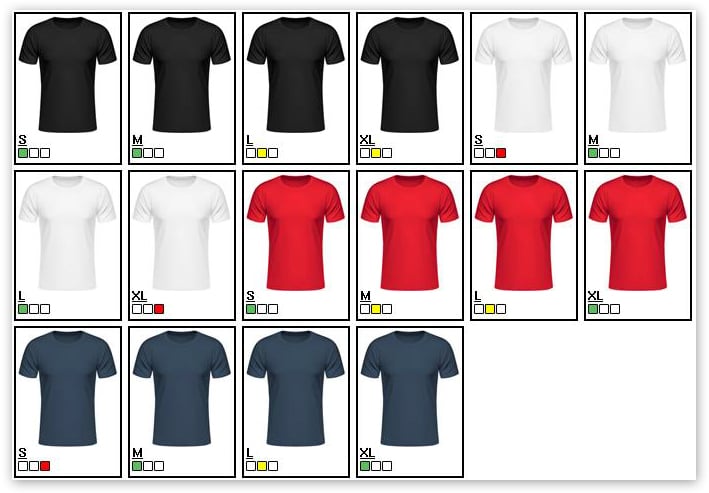
Example 1: consolidate the same first variant
Goal: products whose first dependent variant has the same value show their image only once. With color and size, one image per color therefore appears, and the sizes next to it. Free parameter 1 stores the value of the first variant for this. Before the loop it is reset. Within the iteration, the negated bracket checks whether the stored value differs from the current one. If that is the case, the color has changed, the image is output, and the new value is stored.Example 2: second variant depending on the selection
Goal: at the top, the colors appear as image tiles; below them, only the sizes of the color the customer has chosen. Instead of all sixteen combinations, the customer sees four colors and four sizes. For this, the loop runs twice, each time in its ownCAT-AdvData block. The first pass shows the color tiles, the second the sizes of the chosen color.
The key lies in the first line. ~DC-FP2_set($PR-DepVariationValue1$)~ stands before the first CAT-AdvData, that is, outside the list. There, PR-DepVariationValue1 still refers to the product chosen by the customer. As a result, the chosen color is stored in free parameter 2, and both passes can check against it.
What appears in which pass
The following table shows a customer who has chosen the combination “white, size L”. The first pass outputs one tile per color, the second pass only the white combinations.
At position 5, the tile is output in the first pass and at the same time highlighted as selected, because the customer has chosen a white variant. In the second pass, all four white sizes appear, and only size L is highlighted among them.
Tags
Reference: DC-FPXRelated topics
- Guide: Display dependent variants as a table
- Guide: Display dependent variants as select lists
- Guide: Display dependent variants as links
- Guide: Reload dependent variants via AJAX