
Assigning VAT
General VAT definition in the shop
As part of the One-Stop-Shop procedure, we offer you a global, delivery-country-dependent VAT rate file that you can use for your shops. This is used to calculate the VAT shown in gross shops depending on the selected delivery country. In net shops, it is the VAT added on top accordingly. Alternatively, you can define the VAT rates per shop or subshop and delivery country yourself in your own file.- In rare cases, there are products with different VAT classes in different countries. We are happy to support you with the individual handling of such cases.
- Please check with your ERP provider whether this procedure is supported by it.
When to use the global file and when to use an individual one
As a rule, the global WEBSALE VAT rate file can only be used for shops and subshops that have the following setup:
Shops that have an additional tax rate can no longer use the global WEBSALE VAT rate file and require an individual VAT rate file. This is the case, for example, when the setup looks like this:
An individual VAT rate file is also required if the standard tax rates are used but numbered differently:
Using the global WEBSALE VAT rate file
WEBSALE provides a global VAT rate file for all EU countries. This file contains 4 tax rates per EU country:- Standard tax rate for most goods and services, for example Germany with 19 percent
- Reduced tax rate for certain goods and services, for example Germany with 7 percent
- Strongly reduced tax rate
- Special tax rate
Global VAT rate file with all EU countries (as of 2024-01-01)
Global VAT rate file with all EU countries (as of 2024-01-01)
VAT section of your shop configuration shop.config, add the following parameters to use the VAT rate file provided by WEBSALE. In VATRateDefinition-ByDelivCountry-StandardISO, enter the ISO code of the desired country whose VAT rate is to be applied by default if the buyer has not yet selected another delivery country.
If VAT rates change in the countries of the EU, they are adjusted accordingly by WEBSALE.
Using an individual VAT rate file
Alternatively, you can define the VAT rates yourself with your own file. Step 1: Activation. No activation by WEBSALE is required. Step 2: Create an individual VAT rate file. If you want to use your own VAT rate file, you must create a new config file in the online service area, within the Configuration service, under the global configurations. In this file, you need one section per delivery country with the three-letter ISO country code. Enter the indexes for the different VAT rates of the countries, up to a maximum of 15 per country, and assign the desired VAT rates without a percent sign. Decimal places must be separated from the integer part by a period, that is 19 for 19 percent VAT and 7.7 for 7.7 percent VAT. Note the following required structure of the file and its sections:Please note that VAT rates can change. Current tax rates can be found in the overview of VAT rates in EU countries.
VAT section, add the VATRateDefinition-Mode parameter with the value ByDelivCountry-Individual, and enter the file name assigned in the online service area in the VATRateDefinition-ByDelivCountry-DefinitionFile parameter. In VATRateDefinition-ByDelivCountry-StandardISO, enter the ISO code of the desired country whose VAT rate is to be applied by default if the buyer has not yet selected another delivery country.
Controlling VAT rate changes automatically
If you use the global WEBSALE VAT rate file, changes to the VAT rates in the EU countries are adjusted directly and automatically by WEBSALE. If you use an individual VAT rate file, we recommend using the CampaignControl. With CampaignControl, you can plan and execute time-controlled changes to your shop configurationshop.config.
Pointer: CampaignControl
VAT for products
As described under General VAT definition in the shop, each product is assigned a VAT index. For each index, the VAT rate stored in the global or individual VAT file applies. Technically, the VAT index is entered in the product data fieldVATIndex or transferred to the shop system from the ERP in this field.
Example: Under General VAT definition in the shop, we assigned a VAT rate of 19 percent to index 1 and a VAT rate of 7 percent to index 2.
If a VAT rate of 19 percent is to be applied to a product in the shop, the value 1 must be entered in the product data field VATIndex in the ERP. For products for which the VAT rate of 7 percent is to apply, the value 2 must be entered in the product data field VATIndex.
VAT for shipping costs
For calculating VAT on shipping costs, WEBSALE V8s supports two options, dynamic and static calculation. Which calculation method is to be applied in the shop must be defined by the mail-order business. The prerequisite is the definition of VAT rates.Dynamic calculation (default)
By default, VAT on shipping costs is calculated dynamically. The tax rate applied to the shipping costs is thus determined by the products in the cart. If only products with the same tax rate are in the cart, their tax rate is also applied to the shipping costs. If products with different VAT rates are in the cart, a subtotal is formed for all products with the same VAT rate. The tax rate of the highest subtotal then determines the VAT rate for the shipping costs. You set the calculation method in the shop configurationshop.config in the <VAT> section:
Static calculation
Alternatively, a static calculation of VAT on shipping costs is also possible. In this case, the same VAT rate is always used. To do this, in the shop configurationshop.config in the <VAT> section, the value static must be specified in the DeliveryVATType parameter and a VAT index must be specified in the DeliveryVATRate parameter. As with products, no VAT rate is assigned to this parameter, but one of the VAT indexes.
Example: For shipping costs, the VAT rate of 19 percent stored under index 1 should always apply.
VAT for further costs
For calculating VAT on all other costs, for example payment costs, WEBSALE V8s also supports the two options like for shipping costs, dynamic and static calculation. Which calculation method is to be applied in the shop must be defined by the mail-order business. The prerequisite is the definition of VAT rates.Static calculation (default)
By default, VAT on additional costs is calculated statically. This means that the same VAT rate is always used. You set the calculation method in the shop configurationshop.config in the <VAT> section:
VATType must then have the value static. Some additional costs also have their own parameter VATRate-Value in their section. If this is the case, the desired VAT index must be entered here. If entered there, the general value of the DefaultVATRate parameter in the <VAT> section does not apply to these costs.
Example: A static VAT calculation is to be applied to gift wrapping. The gift wrapping section has its own parameter for assigning the VAT index.
Dynamic calculation
The calculation of VAT on additional costs can also be dynamic. The tax rate to be calculated for the additional costs is then determined by the products in the cart. If only products with the same tax rate are in the cart, their tax rate is also applied to the additional costs. If products with different VAT rates are in the cart, a subtotal is formed for all products with the same VAT rate. The tax rate of the highest subtotal then determines the VAT rate for the additional costs. In the separate sections for the additional costs, the parameterVATType must then have the value dynamic.
Example: A dynamic VAT calculation is to be applied to gift wrapping.
VAT calculations
For a correct VAT calculation, you must have defined and assigned the corresponding VAT indexes for products and costs, as well as the associated VAT rates in the shop configurationshop.config.
Displaying tax amounts
Display with gross or net price
Usually, in B2C shops, that is shops selling to end customers, gross prices must be shown. In shops for corporate customers (B2B), it is more common to show net prices. As a basic setting for a correct VAT calculation in your shop, you must therefore define whether your prices and costs are stored including VAT or excluding VAT, and are to be displayed and shown accordingly in the shop. Step 1: Defining prices and costs as gross or net values. In the<VAT> section of your shop configuration shop.config, you define whether the prices and costs in your shop are gross or net values.
Example: Your shop should be a gross shop, that is, your prices and costs are inclusive of VAT.
Displaying amounts in the cart (optional)
Using the BASKET-VATRates tags, all possible values and amounts can be output for each VAT rate involved in the cart: VAT rate and amount, goods value and order value both gross and net. Display in an alternative currency is also possible.Country-dependent VAT calculation
According to tax legislation, in most countries outside the EU community area, the third countries, an exemption from VAT obligation applies to companies and private individuals. Upon request, WEBSALE V8s supports the TaxJar service for determining taxes incurred in the USA. Your WEBSALE contact will be happy to provide more information. Since the number of countries for which a tax exemption applies is very large, WEBSALE V8s only requires the much smaller list of countries for which the tax obligation applies to be stored, to simplify the work. You store this list in your shop configurationshop.config.
Step 1: Defining the basis for determination. You must first define whether the billing and delivery country or only the delivery country should be used to determine the VAT calculation or exemption.
In the <VAT> section of your shop configuration shop.config, you use the TaxFreeIgnoreBillAddr parameter to define whether the billing country is disregarded, that is, only the delivery country is considered.
Example: For determining a possible VAT exemption, the billing country should be ignored and only the delivery country should be considered.
no must be entered.
Step 2: Entering the countries in the shop configuration. In the TaxCountries parameter in the <VAT> section of your shop configuration shop.config, store a comma-separated list of all countries for which VAT is to be calculated. As a rule, these are all countries belonging to the EU community area.
Example: VAT should be calculated for all countries of the EU community area.
Possible VAT exemption for delivery to the EU community area
Under certain circumstances, for example based on annual revenue, VAT can also be waived for deliveries to corporate customers in EU countries. The underlying tax regulation, in simplified form, looks as follows: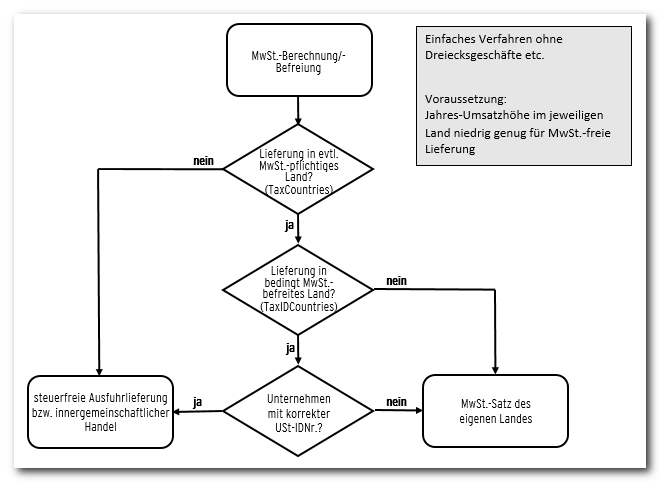
- All deliveries to private customers within the EU community area are taxable.
- All deliveries to corporate customers within the rest of the EU community area, that is EU except domestic, are tax-free. This is referred to as intra-community trade.
- Deliveries to corporate and private customers in most countries outside the EU community area, that is third countries, are usually tax-free. This is referred to as tax-free export delivery.
shop.config, you can store a list of the EU countries in which corporate customers should be exempt from VAT. In principle, this list must never contain your own country, because domestic tax obligation applies.
Prerequisite. A country-dependent VAT exemption for corporate customers is only possible if the buyer has entered a syntactically correct VAT identification number in their address data in the shop. Therefore, please provide this field when requesting the delivery address data and, if applicable, the billing address data.
Reference: Requesting a VAT identification number (VAT ID)
Step 1: Defining the basis for determination. You must define whether the billing and delivery country or only the delivery country should be used to determine the VAT calculation or exemption, see Country-dependent VAT calculation.
Example: Only the delivery country should be considered for the determination.
TaxCountries parameter in the <VAT> section of your shop configuration shop.config contains a comma-separated list of all countries for which VAT is to be calculated in general. Then store the specific countries for corporate customers in which no VAT is to be calculated in the TaxIDCountries parameter.
Example: No VAT should be calculated for all countries of the rest of the EU community area. Third countries do not need to be listed, as they are already excluded by the country list in the TaxCountries parameter.
TaxFreeForAll-Allow parameter in the OrderConditions section of your shop configuration shop.config to yes for this purpose.
VAT calculation for digital goods
Since the introduction of the One-Stop-Shop procedure, no adjustment is required for the sale of digital goods. By using the global VAT rate file, the delivery-country-specific tax rate is always used per delivery country. The only exception would be if a special tax index is transferred for digital goods via the ERP. In that case, an individual VAT rate file must be created that is extended by the entries for the special tax index, for example tax index 10 for digital goods.Special functions
Exempting buyers from VAT
In the customer data, buyers can be flagged as “internal settlement”, for example for settlement between customers or companies within a corporate group. If this flag is set in the customer data, VAT is always deducted in full. This flag can only be set in the online service area with additional authentication and password entry. You can obtain further information from your WEBSALE contact. Reference: A-InterCompanyCustomerVAT exemption with a differing delivery address containing a VAT ID
You can define whether the determination of the VAT exemption should depend on the VAT ID of the delivery address. You make this setting in the<VAT> section of the shop configuration shop.config with the following parameters:
Earlier integration and migration
Here you find the earlier integration of the general VAT definition in the shop. It is still supported, but is no longer recommended. In addition, we provide information here on how to switch to the current VAT definition.General VAT definition in the shop (earlier integration)
For a correct calculation of the VAT or sales tax amount for an order in the shop, it must be ensured that each product is assigned the VAT rate currently applicable to the product, for example 19 percent. Since VAT rates are repeatedly subject to changes, WEBSALE V8s does not assign the VAT rate directly to products in order to reduce the effort involved in changes, but only a VAT index. In the shop configurationshop.config of the associated shop or subshop, a specific VAT rate is then assigned to each VAT index used. Up to 10 indexes can be defined. In the case of a statutory change to a tax rate, only the new tax rate needs to be changed for the respective VAT index. All products in the shop with this VAT index are thus immediately assigned the correct new VAT rate.
You assign the desired VAT rates to the VAT indexes in the shop configuration shop.config in the <VATRates> section.
Example: Two tax rates are to be stored for your online shop. Products with VAT index 1 should be at 19 percent and products with VAT index 2 should be at 7 percent. Then the definition looks like this:
Controlling VAT rate changes automatically (earlier integration)
For legally triggered changes to the VAT rate in a country, the shop software can adjust the VAT rate for the respective subshop automatically. The change required for this is controlled by a new section in the shop configurationshop.config.
To have the VAT rate automatically adjusted on a specific effective date, add a new, time-controlled <VATRates> section in the shop configuration shop.config after the regular <VATRates> section that contains the date up to which the previous VAT rate applies.
Example: For Switzerland, the VAT rate changes from 8 to 7.7 percent on 2018-01-01. The change should apply automatically from 2018-01-01, 00:00. Insert the following date-controlled section into the shop configuration shop.config of the subshop, specifically after the regular <VATRates> section without date control:
Migration to the global or individual VAT rate file
As part of the One-Stop-Shop procedure, we offer you a global, delivery-country-dependent VAT rate file that you can use for your shops. This is used to calculate the VAT shown in gross shops depending on the selected delivery country. In net shops, it is the VAT added on top accordingly. Alternatively, you can define the VAT rates per shop or subshop and delivery country yourself in your own file. If you have country-specific shops in use that only allow deliveries to that country, no changes are required.- In rare cases, there are products with different VAT classes in different countries. We are happy to support you with the individual handling of such cases.
- Please check with your ERP provider whether the new procedure is supported by it.
When to use which procedure
Whether the global WEBSALE VAT rate file can be used or not must always be decided individually per shop or subshop. As a rule, the global WEBSALE VAT rate file can only be used for shops and subshops that have the following setup:Migration to the global WEBSALE VAT rate file
WEBSALE provides a global VAT rate file for all EU countries, with four tax rates per EU country. All WEBSALE shops access this file, so adjustment for an individual shop or subshop is not possible. You can find the complete content above in Using the global WEBSALE VAT rate file. Step 1: Activation. No activation by WEBSALE is required. Step 2: Extending the shop configuration. In theVAT section of your shop configuration shop.config, add the following parameters. In VATRateDefinition-ByDelivCountry-StandardISO, enter the ISO code of the desired country whose VAT rate is to be applied by default if the buyer has not yet selected another delivery country.
?test=on to any shop call.
?test=off to any shop call to deactivate the test mode.
VAT section of your shop configuration shop.config, remove the VATRateDefinition-TestMode parameter and add the VATRateDefinition-Mode parameter.
If VAT rates change in the countries of the EU, they are adjusted accordingly by WEBSALE.
Migration to an individual VAT rate file
Alternatively, you can define the VAT rates yourself with your own file. Step 1: Activation. No activation by WEBSALE is required. Step 2: Create an individual VAT rate file. If you want to use your own VAT rate file, you must create a new config file in the online service area, within the Configuration service, under the global configurations. In this file, you need one section per delivery country with the three-letter ISO country code. Enter the indexes for the different VAT rates of the countries, up to a maximum of 15 per country, and assign the desired VAT rates without a percent sign. Decimal places must be separated from the integer part by a period, that is 19 for 19 percent VAT and 7.7 for 7.7 percent VAT. A complete template for the filevatrates.config with all EU countries can be found above in Using the global WEBSALE VAT rate file.
Please note that VAT rates can change. Current tax rates can be found in the overview of VAT rates in EU countries.
VAT section, add the VATRateDefinition-TestMode parameter with the value ByDelivCountry-Individual, and enter the file name assigned in the online service area in the VATRateDefinition-ByDelivCountry-TestDefinitionFile parameter. In VATRateDefinition-ByDelivCountry-StandardISO, enter the ISO code of the desired country whose VAT rate is to be applied by default if the buyer has not yet selected another delivery country.
VAT section, remove the VATRateDefinition-TestMode and VATRateDefinition-ByDelivCountry-TestDefinitionFile parameters. Add the VATRateDefinition-Mode and VATRateDefinition-ByDelivCountry-DefinitionFile parameters.