
Important notes
Please observe the following notes before calling your shop with the release version. In the release version, the automatic search engine control tells search engines that indexing of the pages is prohibited. This means thatWS-RobotControl will always output noindex,nofollow. This prevents page views with the URLs of the release version from ending up in search engines.
Reference: WS-RobotControl
Calling the release version
Depending on whether you use SEO URLs in your shop, the call of the release version differs.Calling the release version for shops with SEO URLs
Append the release pathwebsalev8s-releasecandidate/ to the shop domain.
Calling the productive version:
Calling the release version for V8s shops with parameter URL logic
For shops that do not use SEO URLs, the call parameterwebsale8 must be replaced with websalev8-releasecandidate.
Calling the productive version:
Subsequent calls
When the release version is called, all links generated by the shop system are automatically set so that subsequent calls within the session are also executed under the release version. Within a session, you can switch between the productive and release versions at any time for comparison purposes by adjusting the call URL in the browser accordingly. During your tests, check after each click whether the shop was called with the release version. You can recognize this by the URL or in the developer console, as described in the following section.Determining whether the shop was called with the release version
Using the URL in the browser, you can tell at any time whether the shop was called with the release or the productive version. If the stringwebsalev8s-releasecandidate or websalev8-releasecandidate appears in the URL, you have called the shop with the release version.
Depending on whether the shop was called with SEO URLs or with parameter URLs, or whether a form was submitted, the URL looks different.
Check the build of the release version
The build version of the shop software can be read out when the shop is in test mode. How to enable test mode is described in the guide Enabling and disabling shop test modes. The identifier is contained in the support information, which is present as a comment in the head area of the HTML code. View as HTML source or in the Elements Inspector: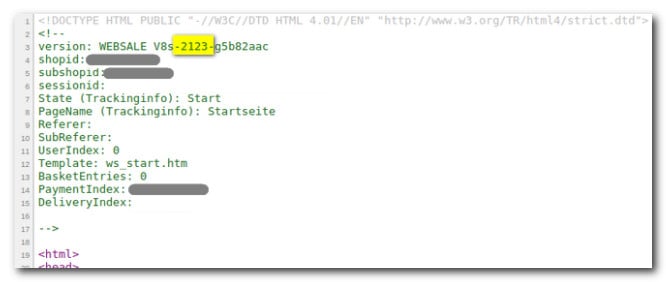
version parameter between the two hyphens after the main version V8s — for example, 2123.
If this number is higher than when calling the productive version, then the shop is in the current release version.