
Accessing the service
You reach the service via the following URL:Voucher and voucher charge
A voucher is the code that a customer can redeem in the shop. A voucher charge governs everything around the voucher, for example value, currency, validity period and redemption conditions. Each voucher belongs to exactly one charge and inherits its settings.When you create a voucher, a charge is therefore always created and, depending on the procedure, the vouchers within it.
The charge is addressed via its ID. This ID is the only value with which other places in the system refer to a charge, for example a purchase voucher product.
The areas of the voucher administration
The service is divided into three tabs with the following contents: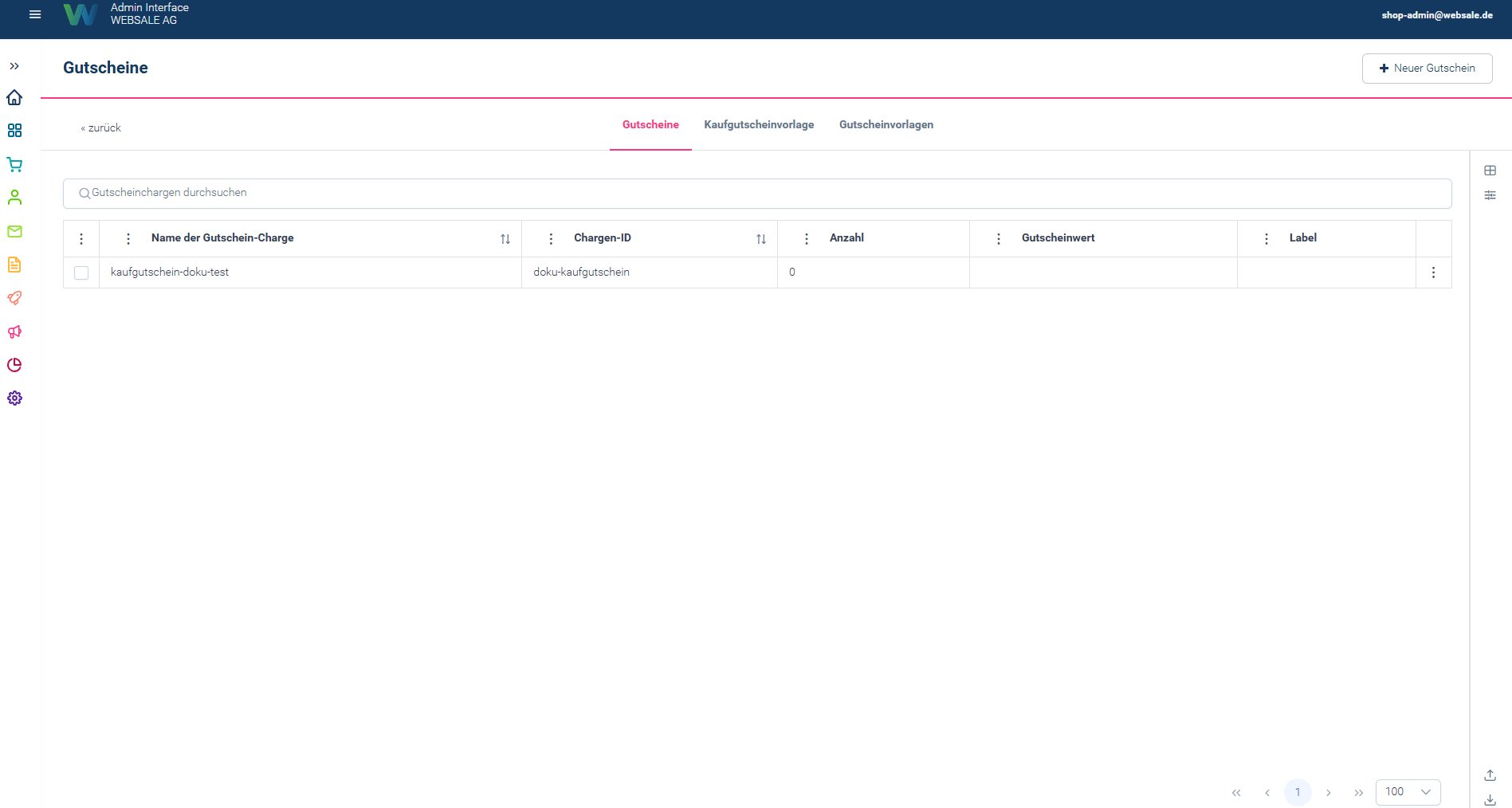
Screenshot as of 01.09.2026
In the list of charges, the “Quantity” column is the quickest distinguishing feature. If it shows a number greater than zero, the charge contains ready-made voucher codes. If it shows
0, the charge belongs to a purchase voucher template whose codes are only created with an order.Voucher types
When creating a voucher, “Voucher type” distinguishes between two types. The selection you make determines which items the voucher applies to.Creating a voucher charge
”+ New voucher” opens a form with several sections. It is filled in from top to bottom; the sections are also accessible as tabs.Template
First, a voucher template is selected or the option “Without template” is chosen. The remaining sections are only displayed after this selection. A selected template prefills the corresponding fields and locks the others.General settings
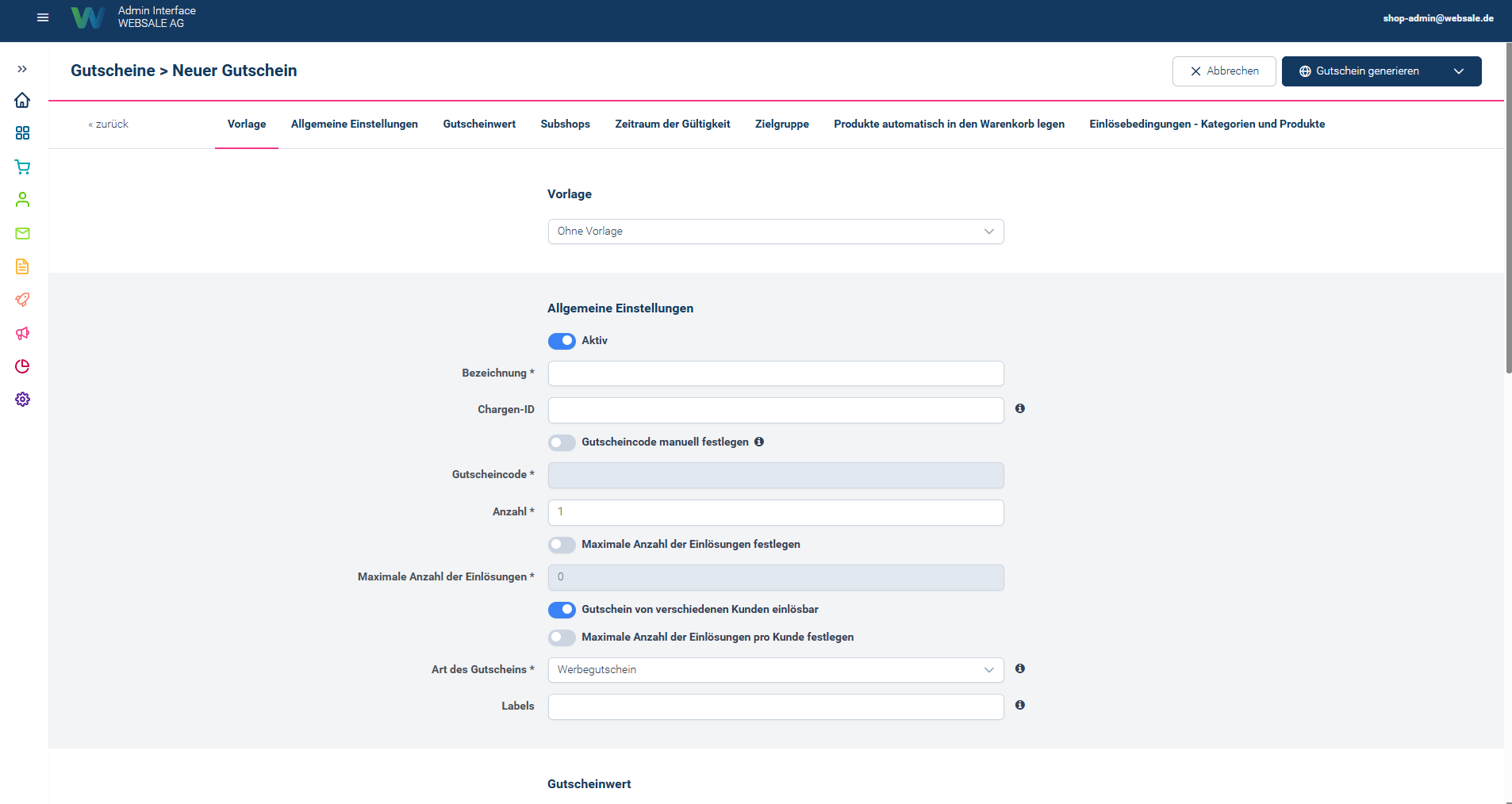
Screenshot as of 01.09.2026
Voucher value
The calculation type determines whether the voucher deducts an absolute amount, grants a percentage discount or grants a percentage discount up to a maximum amount. Below that, there is one row per currency with currency, VAT ID, voucher value and minimum order value. Further rows can be added via “Add another currency”. A voucher only applies in currencies for which a row exists.The minimum order value entered here only acts as a redemption condition for this specific voucher. It is not a global minimum order value for the shopping cart or checkout. How multiple minimum order values are combined when several vouchers are redeemed at once is controlled by
minOrderValueCalculation and minOrderValueIgnoreVoucherReduction under Checkout order process.- Remaining amount: With “Remaining amount reusable”, an unused amount is retained and can be redeemed again later. With “Remaining amount expires”, the voucher is used up after the first redemption.
- Free shipping: Sets the shipping costs to zero upon redemption. A partial reduction of the shipping costs (for example a 50% discount) is not supported via vouchers; the option only ever applies as “fully free” or not at all.
Further sections
Saving
The “Generate voucher” button is a split button. The arrow next to it opens three further options. The selection determines what is actually generated: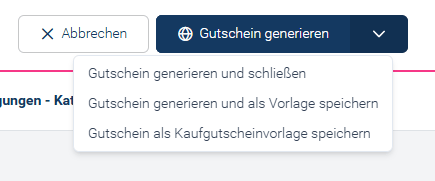
Screenshot as of 01.09.2026
Creating a purchase voucher template
A purchase voucher template is the basis for vouchers that are sold in the shop. It does not contain any codes itself. These are only created when a customer orders a purchase voucher product, one per ordered unit. The template is created in the same form as an ordinary charge:1
Assign name and charge ID
The name becomes the purchase voucher template ID. The charge ID should be assigned manually and meaningfully, for example
geschenkgutschein, because exactly this value is later entered at the product. If the field is left empty, the generated number has to be looked up in the list afterwards.2
Set the voucher type to purchase voucher
Sold vouchers are a means of payment and should work regardless of whether individual products are approved for value vouchers.
3
Voucher value absolute, but without an amount
The calculation type is set to “absolute”, the voucher value remains at
0. The actual value is set by the price of the sold product. The charge should only carry one currency. For the remaining amount, “Remaining amount reusable” is the right choice, otherwise the rest of the purchased credit expires after a partial redemption.4
Save via the arrow menu
In the menu next to “Generate voucher”, select the entry “Save voucher as purchase voucher template”. The main button would instead create ready-made voucher codes, which a purchase voucher product cannot use.
0.
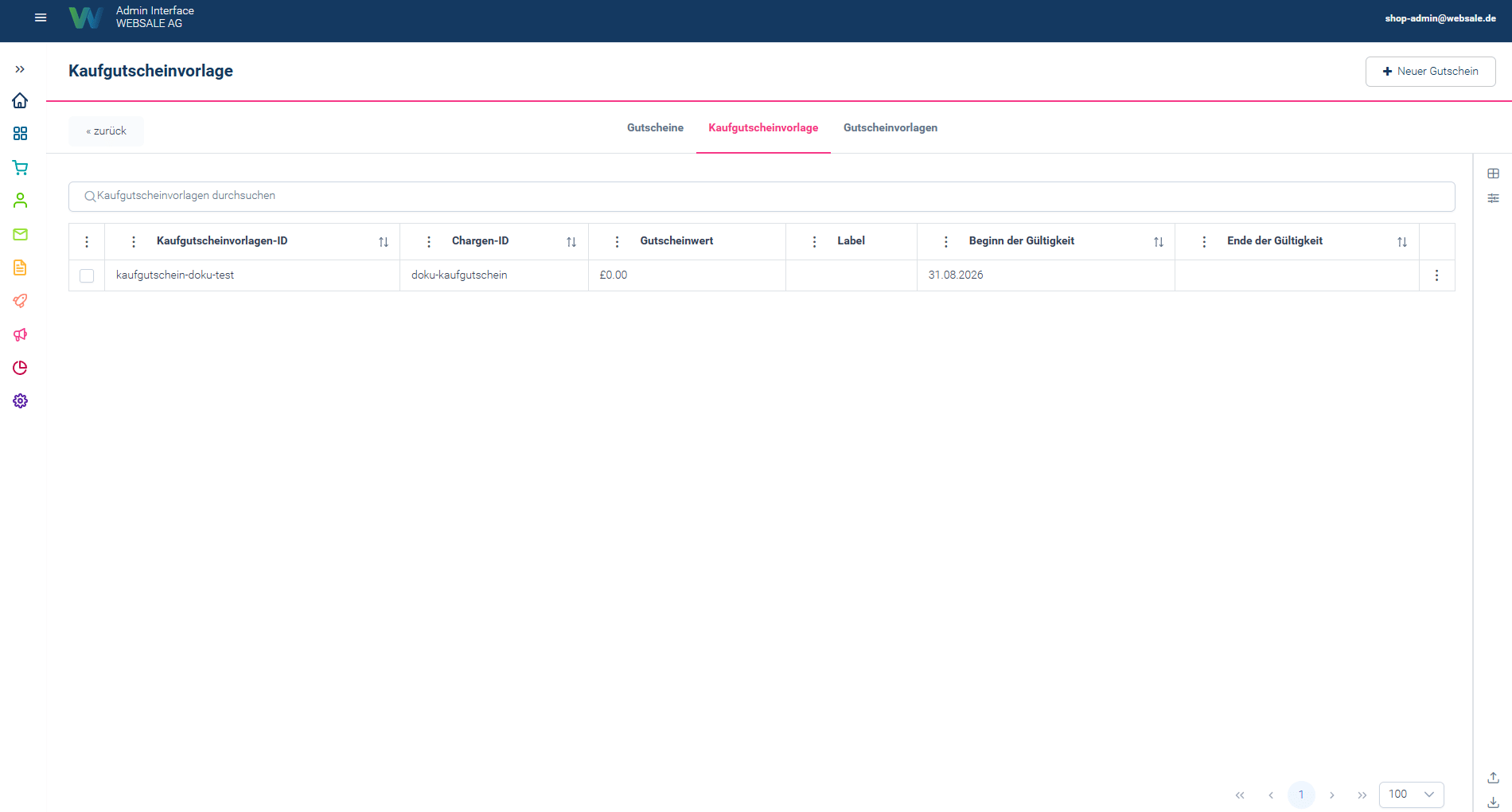
Screenshot as of 01.09.2026
Voucher templates
A voucher template saves the entries of the form so that recurring campaigns do not have to be filled in from scratch every time. It is created via the entry “Generate voucher and save as template” and is then available for selection in the “Template” section at the top. Templates only take effect when creating a voucher. A changed or deleted template has no influence on charges and vouchers that have already been generated.Display in the shop
How vouchers appear in the shop is determined by the template. There are no settings for this in the Admin Interface.- The input field for the voucher code, the list of redeemed vouchers and the error texts are output in the template. Examples are given in the practical examples for vouchers.
- Which data is available for this is described by the module $wsVoucher.
- Sold vouchers do not appear via this module, but at the basket item, see Creating a purchase voucher product.
Concepts and technical names
Guide
- Creating a purchase voucher product describes the second part of the process.
- API reference vouchers describes the same objects via the interface.
- Practical examples - Vouchers shows how vouchers are redeemed in the shop template.
- checkout - Order flow describes the settings for redemption during the order flow.