
The voucher fields at the product
A purchase voucher product is controlled via the following fields. They are located in the product form in the “General fields” section:Creating the purchase voucher product
The product is created in the Admin Interface under Katalog → Produkte via ”+ New product”. First the usual entries in the General fields section:
Further down in the same section are the voucher fields:
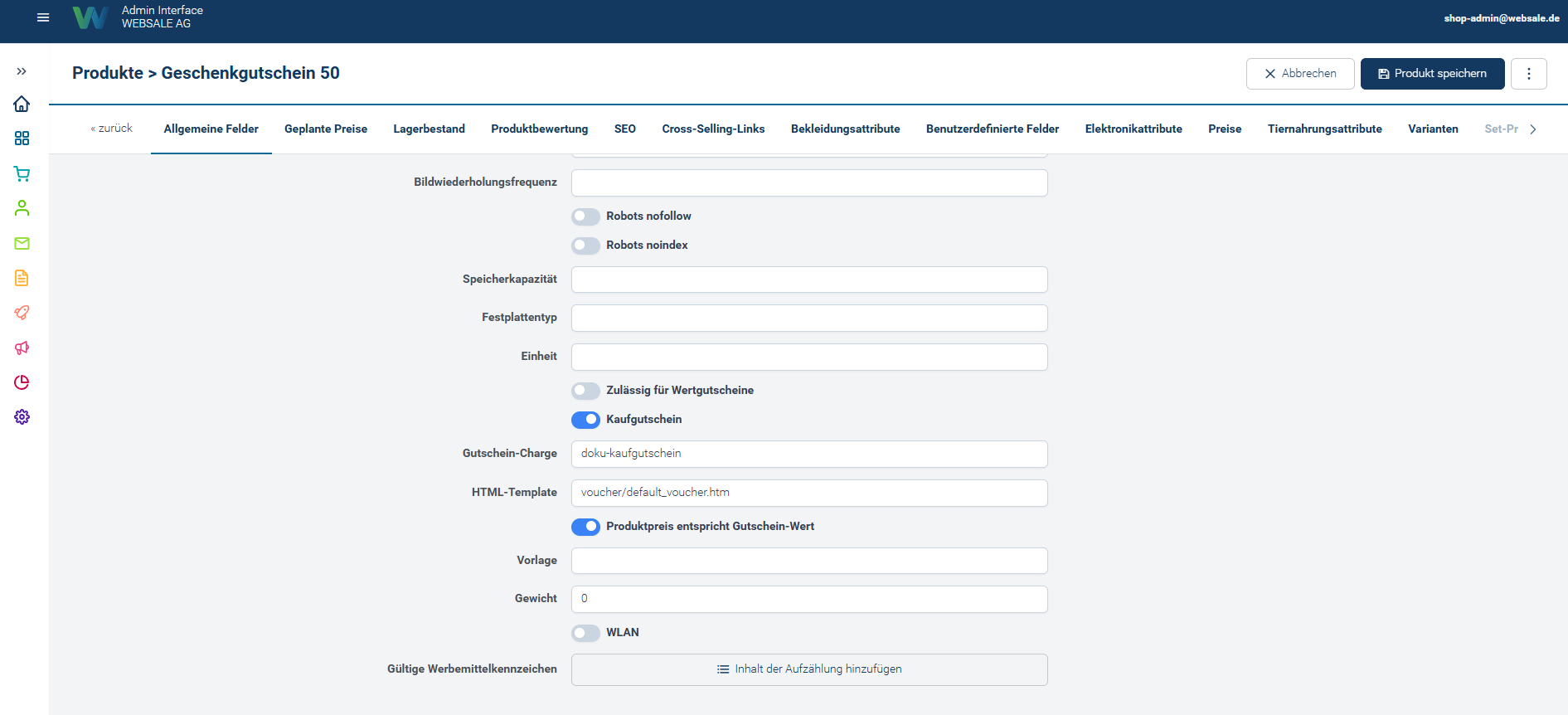
Screenshot as of 02.09.2026
Setting the voucher value
The value of a purchased voucher can come from two sources. Which one applies is decided by the “Product price equals voucher value” switch at the product.Offering the customer several value levels
There is no function for a freely typed-in amount. The customer always chooses from fixed value levels, and there are two ways to set this up:
Both approaches manage with a single purchase voucher template as long as “Product price equals voucher value” is switched on.
Payment methods and shipping methods
Because a purchased voucher is immediately redeemable, restrictions apply in the order flow that need to be set.Payment methods
A voucher is immediately redeemable, but with a payment method with a payment term the money for it has not yet been received. To rule out this risk, there is the checking servicepaymentValidation.voucherDeny. It blocks a payment method as soon as a voucher product is in the basket.
It is not entered centrally, but per payment method in its validations list under payment.payment. The entry makes sense for all payment methods with a payment term, typically invoice, prepayment, cash on delivery and direct debit.
Without this entry, all payment methods remain selectable, even with a voucher in the basket. The checking services themselves carry no values; they are only referenced. If you look for the block on the checking services side, you will find nothing there.When the service takes effect, it applies to the entire order and not just to the voucher item. If a voucher product is in the basket alongside regular articles, the payment method is blocked for the whole basket.
Shipping method and product type
A basket that only contains vouchers does not need physical shipping. For this, a dedicated, always free shipping method is created and restricted to voucher products via the checking serviceshippingMethodValidation.productType. This entry is also made per shipping method in its validations list under checkout.shippingMethod. The complete example with price scale and rule list can be found in the practical examples for vouchers.
What happens at order completion
The vouchers are not created when the product is added to the basket, but when the order is completed:- The shop reads the charge ID from the product field and looks for the purchase voucher template with this ID.
- It generates one voucher per ordered unit with the data of the template.
- If “Product price equals voucher value” is active, it takes the item price as the voucher value; otherwise the value from the template applies, see Setting the voucher value.
- If no template exists for the ID, it treats the charge as a pool of imported codes and reserves from it. If that is not possible either, the order completion aborts.
data.orderList.item[].voucher, see API reference orders. As long as an order has not been completed, both lists remain empty.
Display in the shop
How the voucher appears in the shop is determined by the template. There are no settings for this in the Admin Interface.- The view template stored in the “HTML template” field generates the PDF. The basics are described under PDF views.
- The download link for the customer is output on the order confirmation page and in the order confirmation email. A complete example can be found in the practical examples for vouchers.
Typical errors
The exact cause can be found in the LogManager. All messages of the voucher generation start with
voucherService.:
Guide
- Vouchers describes how to create the purchase voucher template.
- content - Catalogue (categories & products) describes the custom product fields and their assignment.
- API reference products describes the same fields via the interface.
- PDF views describes the generation of the voucher PDF.