
The Mobile WebApp
Mobile access to a WEBSALE shop is not an app that has to be installed, but a separate subshop. This results in three properties:- You are free in design and range of functions, just as with any other subshop.
- The shop runs on every device, regardless of the operating system, and without installation.
- The product range can match that of the main shop or differ from it, as with any subshop.
What is detected
Both can be used individually or together. Device detection is automatically available with a mobile subshop and does not require separate activation.
Part of the technology described here works with cookies so that the visitor’s decision does not have to be requested again on every visit. Cookies that are strictly necessary for operation are permitted without consent; nevertheless, coordinate their use with your data protection officer.
All examples on this page use jQuery. Make sure it is included on the affected pages.
Including the libraries
Both types of detection require the same two files. They belong in the<head> section of all pages on which detection should take place.
Detecting the device
The basic framework
The following script also belongs in the<head> section. It defines what is checked and where the visitor should be redirected.
The prompt from
ws_mobile_question only appears on devices that can also display the standard shop. Where this is not the case, the switch happens without a prompt.Which device triggers what
Each UserAgent and each resolution is assigned one of three actions:
There are two ways to make the assignment, and the difference between them determines what happens with unknown devices:
Extend the standard list. Each entry overrides exactly the entry of the same name in the standard list; everything else remains in place.
Deciding by screen resolution
Ifws_mobile_detection_type is set to resolution, the resolution decides on the redirect. The UserAgent list then only serves to detect a mobile device in the first place; its actions are no longer evaluated.
In the following example, the visitor is prompted from 800 pixels in height or width, no switch happens at all from 1000 pixels, and everything below is redirected without a prompt.
Replacing parts of the address
When redirecting, the shop swaps the domain and subshop ID. If more of the address needs to change, for example because the mobile shop names a template differently, list the replacements.to removes the string entirely.
Asking on every visit
Normally, the question is only asked the first time the shop is called up. It can also be asked on every subsequent visit, as long as the visitor has not explicitly switched to the desktop version.WS-OTP1 bracket to the corresponding link:
Switching between the versions
Regardless of detection, visitors should be able to switch themselves at any time. This requires one link for each version and a script that remembers the decision.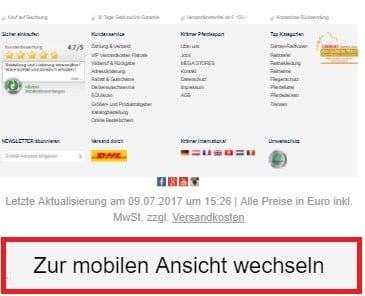
Detecting the country
With country detection, the shop determines the country of origin from the IP address and offers the visitor the matching shop in a layer above the page.The script
If
ws_redirect_cookie_age is set, the visitor can save their selection via a checkbox in the layer. The layer then no longer appears for the specified period, and the visitor is taken directly to their shop.If the function in
ws_redirect_open_layer itself returns a function, ws_redirect_close_layer is overwritten with it. You can therefore define the closing in the same function in which you describe the opening.The country list
Each entry in the list assigns a shop to one or more countries.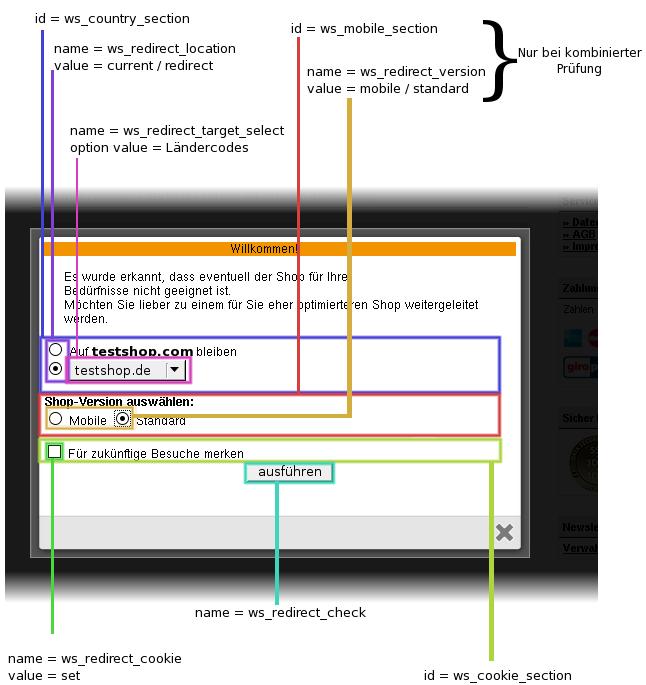
Another country is added as an additional entry:
The selection layer
You design the visible part yourself. The IDs, classes and field names in the following framework must not be removed or renamed, as the script uses them to find the elements.Unlike the country codes in the country list, the country codes in the class names are in uppercase, for example
ws_country_text_DEU.Testing
Use the GeoIP test mode to check whether the layer appears correctly, without having to change country. Guide: Switching the shop’s test modes on and offEvaluating device and country together
Both checks can be combined. To do this, the same country gets two entries that differ indevice and in the domain.
Here,
ws_redirect_detection() is called, not ws_country_detection(). Only this function evaluates country and device together.The standard list of UserAgents
This list applies as long as you do not setws_mobile_agent_list entirely yourself.
The entries are checked against the UserAgent and may contain simple patterns, see
android.*mobile. Some of the listed systems are no longer relevant today. This does no harm to the list; it simply no longer takes effect for these devices.Related topics
- Guide: Sitemaps, robots.txt and mobile subshops
- Guide: Switching the shop’s test modes on and off
- Guide: JavaScript and jQuery