> ## Documentation Index
> Fetch the complete documentation index at: https://dokumentation.websale.de/llms.txt
> Use this file to discover all available pages before exploring further.
# Text snippets
> Text snippets are the central location where all texts that the shop displays in various places are maintained.
export const confTextbausteine = "Templates und Content -> Textbausteine und Übersetzungen";
A text snippet consists of a name and a text. The template only references the name, not the text itself. That way you change the text in one place and the change takes effect everywhere the snippet is used. Typical examples for this
Which text appears in the shop depends on the language in which the called shop area (subshop) is running.
The texts are maintained in the Admin Interface under the service{confTextbausteine}.
## The overview
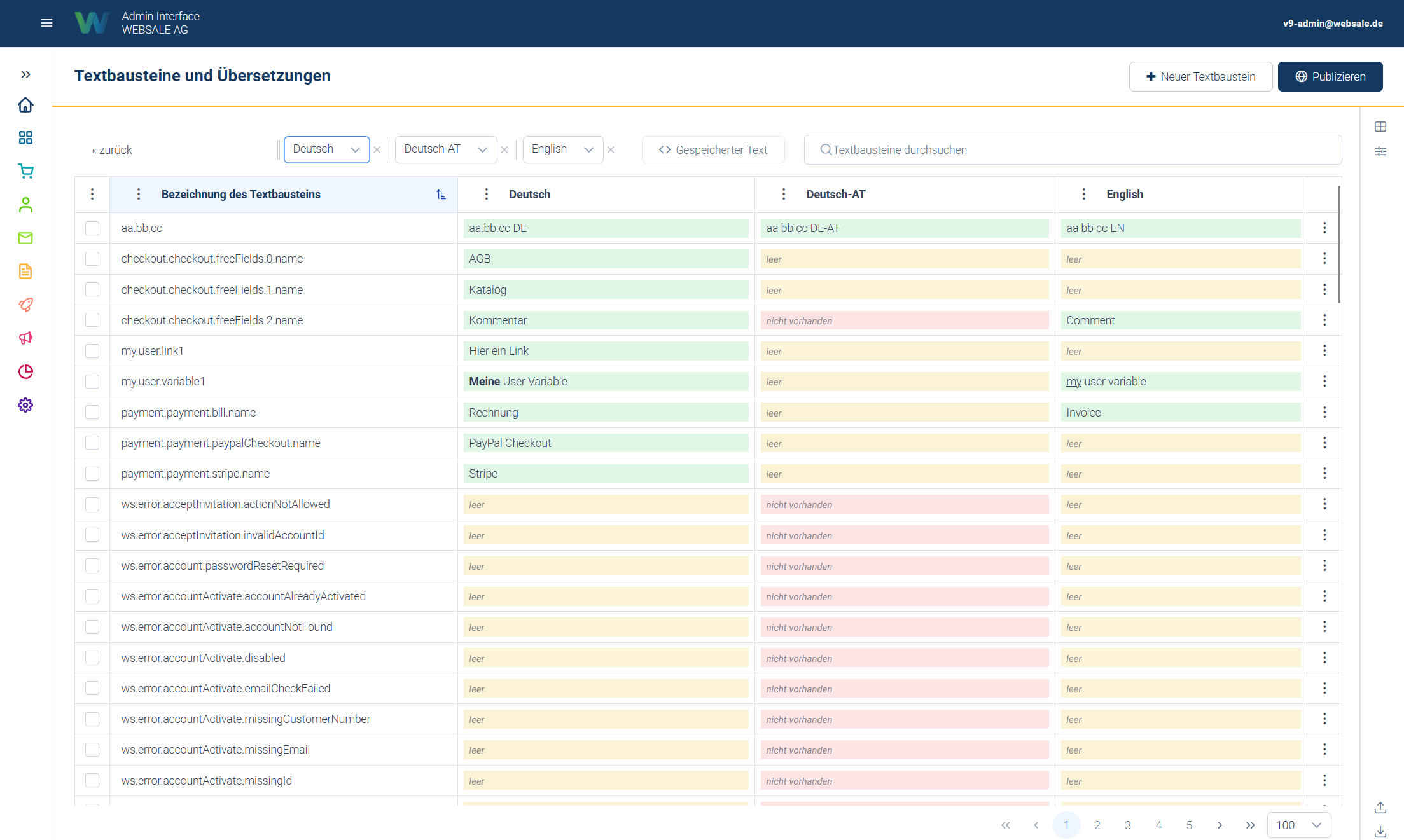 The service shows a table in which each row corresponds to a text snippet and each additional column to a language. Up to three languages can be compared side by side and edited directly in the table.
The availability status indicates the state of a text snippet in a specific language. There are three variants, color-coded in the cells:
* **green = maintained** – a text is present.
* **yellow = empty** – an entry exists for this language, but without content.
* **red = missing** – no entry exists yet for this language.
This makes it easy to see at a glance where gaps still exist in a language.
Since many text snippets across multiple languages accumulate over time, the overview can additionally:
* be searched (by name and text),
* be filtered, e.g. by whether a text snippet is actually used somewhere in the shop or not, by whether it is a system or custom text snippet, and by the availability status in a specific language,
* be narrowed by area (e.g. all text snippets that belong to checkout).
## System and custom text snippets
Some text snippets are required by the system itself, for example for standard messages that the shop outputs automatically. These system text snippets can be translated or adjusted in every language, but not deleted, because the shop would otherwise no longer have any text at that place. Their name begins with `ws.`
In addition, any number of custom text snippets can be created, for example for individual notes or content that is only needed in this shop. These can be fully created, edited, and also deleted again.
## Languages and inheritance
The service shows a table in which each row corresponds to a text snippet and each additional column to a language. Up to three languages can be compared side by side and edited directly in the table.
The availability status indicates the state of a text snippet in a specific language. There are three variants, color-coded in the cells:
* **green = maintained** – a text is present.
* **yellow = empty** – an entry exists for this language, but without content.
* **red = missing** – no entry exists yet for this language.
This makes it easy to see at a glance where gaps still exist in a language.
Since many text snippets across multiple languages accumulate over time, the overview can additionally:
* be searched (by name and text),
* be filtered, e.g. by whether a text snippet is actually used somewhere in the shop or not, by whether it is a system or custom text snippet, and by the availability status in a specific language,
* be narrowed by area (e.g. all text snippets that belong to checkout).
## System and custom text snippets
Some text snippets are required by the system itself, for example for standard messages that the shop outputs automatically. These system text snippets can be translated or adjusted in every language, but not deleted, because the shop would otherwise no longer have any text at that place. Their name begins with `ws.`
In addition, any number of custom text snippets can be created, for example for individual notes or content that is only needed in this shop. These can be fully created, edited, and also deleted again.
## Languages and inheritance
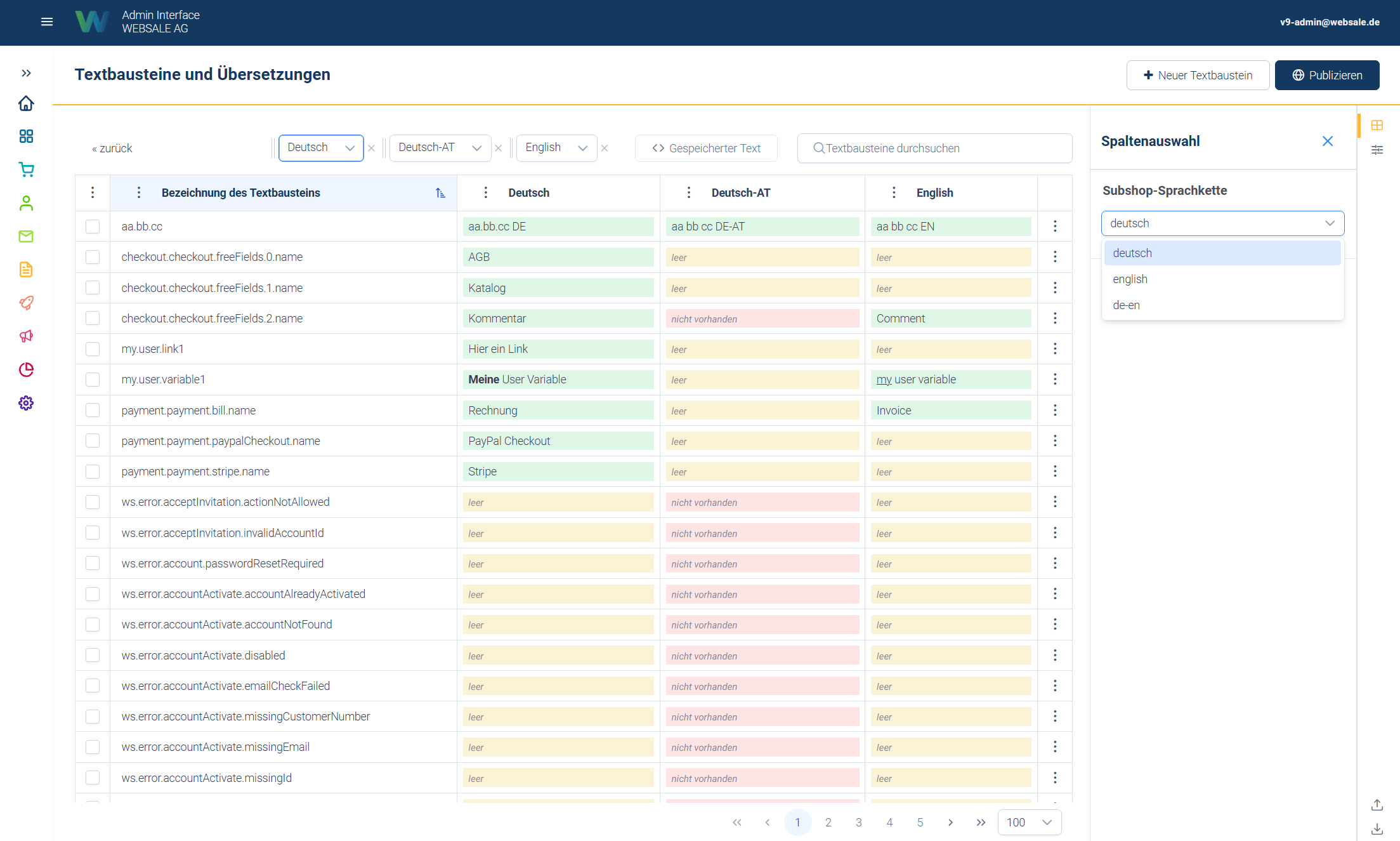 Not every language variant of a shop has to be maintained independently. Languages can be configured so that a language has one or more fallback languages, which are used when a text is missing or empty in the actual language.
An example: A language "English" can have "German" set as its fallback language. If a text snippet is not maintained in English, the German text is displayed automatically instead of showing an empty place.
Such chains can also be multi-stage. For example, a very specific language variant can occur first, which then falls back to a more general variant and only then to the main language. Important here is that the chain is not inherited further. Each language carries its own complete list of fallback languages.
Not every language variant of a shop has to be maintained independently. Languages can be configured so that a language has one or more fallback languages, which are used when a text is missing or empty in the actual language.
An example: A language "English" can have "German" set as its fallback language. If a text snippet is not maintained in English, the German text is displayed automatically instead of showing an empty place.
Such chains can also be multi-stage. For example, a very specific language variant can occur first, which then falls back to a more general variant and only then to the main language. Important here is that the chain is not inherited further. Each language carries its own complete list of fallback languages.
For a specific variant to fall through a more general one down to the main language, both must be entered on it. It is not enough for the more general variant to reference the main language.
The effect for editors: It is not necessary to maintain every text in every language variant. It is enough to fully maintain the base language. More specific variants automatically take over its contents as long as they have no text of their own entered. Only when a specific variant requires its own, deviating text is it entered there deliberately. It then overrides the inherited version only for this language.
For the output in the shop, **empty** and **missing** behave the same: both trigger the fallback to the fallback language. A deliberately empty stored text therefore does not suppress the output; as long as any language in the chain contains a text, that text is displayed. To actually display nothing at a given place, the text must be empty or missing in all languages of the chain.
The difference between the two states is therefore mainly an indicator for editors: it shows whether a language has already been worked on.
## Effect in the shop
Two points are central for understanding, because they easily lead to confusion:
A text snippet is only displayed if it is embedded in the template at the appropriate place. Creating or changing a text snippet alone is not enough. The respective shop page must also actually reference this text snippet at the corresponding place. If you change an already embedded text snippet, the change takes effect immediately. A completely new text snippet only appears in the frontend once it has additionally been inserted into the respective template.
Until publication, changes remain in the editing state without customers seeing them.
## Import and export
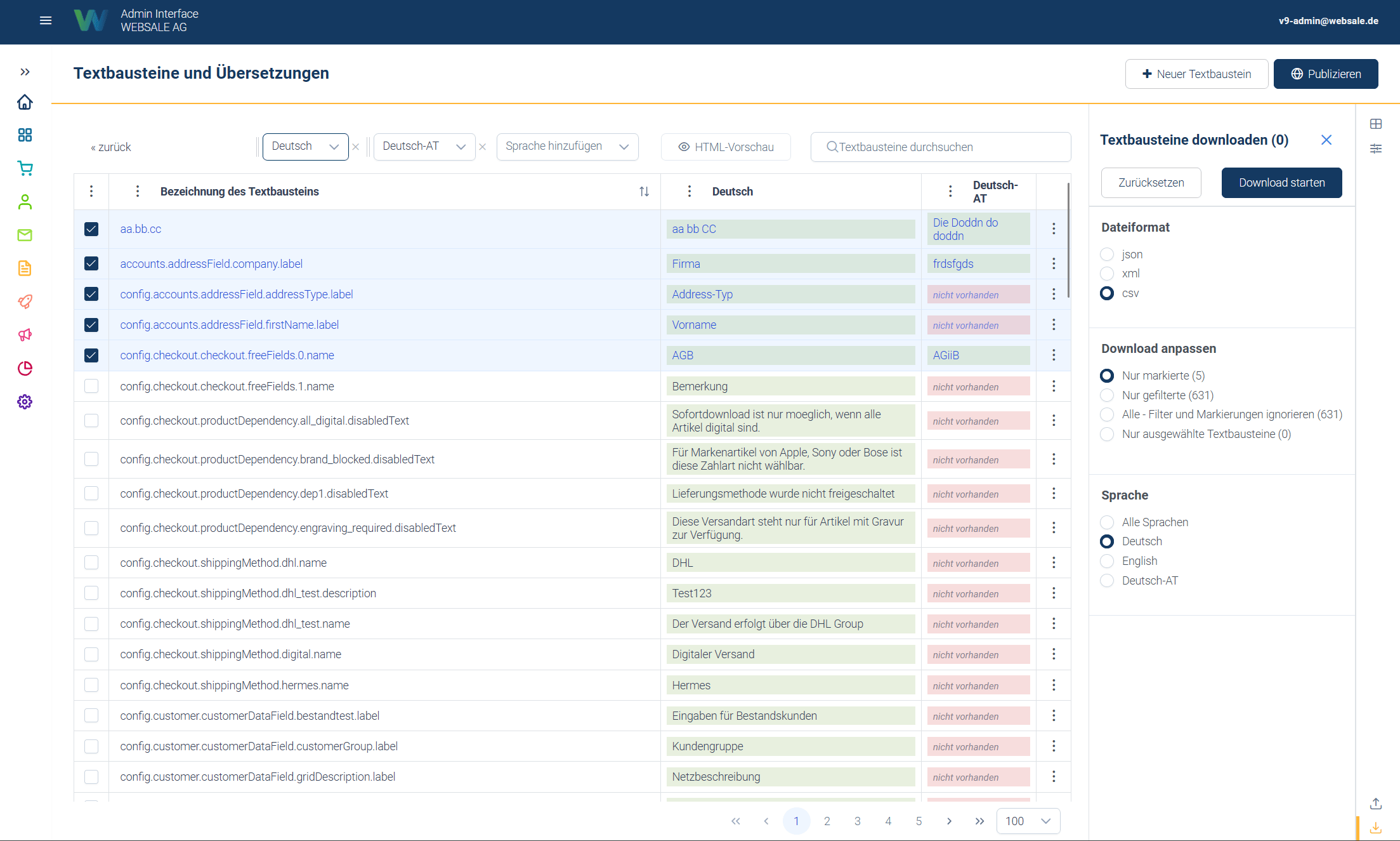 Larger amounts of text snippets can be exported and imported again, for example to have them translated externally or to apply changes in bulk. This can be limited to a single language, so that for example only the French texts are exported, translated externally, and then imported again.
The export takes the currently set search and the set filters into account. Both processes run in the background and are accompanied by a progress indicator. Imported texts also only become visible in the shop after publication.
Before larger or destructive actions, an export is recommended as a backup, because an export can be re-imported unchanged.
## Setting up languages
This section concerns shop administration and is only needed when a language is newly created or assigned to a subshop.
There is no shop-wide master language from which the subshops are derived. Instead, each subshop has its own main language, and the inheritance depends on that language.
From this follows the direction of the chain: it points from the specific variant to the general variant, not the other way around. An Austrian subshop therefore receives "German (AT)" as its main language and "German" as its fallback language.
Anyone coming from WEBSALE V8s often expects the opposite pattern here: a master language `DEU` with the variants `AT` and `CH` set as fallback languages. That, however, does not lead to the goal. The fallback languages are always entered on the more specific language, with the more general one as the target.
For a subshop to use the texts of its language, three settings are required. Two of them concern the same assignment and must match:
Under `general.language`, create the language and enter its fallback languages in the desired order.
`https:///admin/config/general.language`
Under `general.subshopView`, enter the language as the main language for the respective subshop.
`https:///admin/config/general.subshopView`
Under `general.subshop`, enter the same language for the respective subshop.
`https:///admin/config/general.subshop`
The most commonly overlooked point is that only one of the two assignments has to be changed. The symptom is inconspicuous, because the shop continues to display texts - but the wrong ones. For example, the Austrian subshop remains filled with German texts even though Austrian language variants are maintained.
Larger amounts of text snippets can be exported and imported again, for example to have them translated externally or to apply changes in bulk. This can be limited to a single language, so that for example only the French texts are exported, translated externally, and then imported again.
The export takes the currently set search and the set filters into account. Both processes run in the background and are accompanied by a progress indicator. Imported texts also only become visible in the shop after publication.
Before larger or destructive actions, an export is recommended as a backup, because an export can be re-imported unchanged.
## Setting up languages
This section concerns shop administration and is only needed when a language is newly created or assigned to a subshop.
There is no shop-wide master language from which the subshops are derived. Instead, each subshop has its own main language, and the inheritance depends on that language.
From this follows the direction of the chain: it points from the specific variant to the general variant, not the other way around. An Austrian subshop therefore receives "German (AT)" as its main language and "German" as its fallback language.
Anyone coming from WEBSALE V8s often expects the opposite pattern here: a master language `DEU` with the variants `AT` and `CH` set as fallback languages. That, however, does not lead to the goal. The fallback languages are always entered on the more specific language, with the more general one as the target.
For a subshop to use the texts of its language, three settings are required. Two of them concern the same assignment and must match:
Under `general.language`, create the language and enter its fallback languages in the desired order.
`https:///admin/config/general.language`
Under `general.subshopView`, enter the language as the main language for the respective subshop.
`https:///admin/config/general.subshopView`
Under `general.subshop`, enter the same language for the respective subshop.
`https:///admin/config/general.subshop`
The most commonly overlooked point is that only one of the two assignments has to be changed. The symptom is inconspicuous, because the shop continues to display texts - but the wrong ones. For example, the Austrian subshop remains filled with German texts even though Austrian language variants are maintained.
In this case, first check whether `general.subshopView` and `general.subshop` name the same language.
## Guide
* [actions – error texts & emails](/en/konfiguration/actions-fehlertexte-e-mails) – how the system error texts (`ws.error.*`) are structured.
* [Overview – Configuration](/en/konfiguration#verwendung-von-textbausteinen-in-konfigurationen) – how configurations reference text snippets instead of containing fixed texts.
* [`general` – General shop settings](/en/konfiguration/general-allgemeine-shopeinstellungen) – reference for `general.language`, `general.subshop`, and `general.subshopView`.
* [Configuration deep links](/en/admin-interface/konfigurations-deeplinks) – direct links to the configuration nodes.
* [API reference text snippets](/en/schnittstellen/admin-interface-api/api-referenz-textbausteine) – endpoints, filters, and import/export interface.
## Related topics
- [Template engine](/en/frontend/die-basics/template-engine.md)
- [API reference text snippets](/en/schnittstellen/admin-interface-api/api-referenz-textbausteine.md)
- [actions - Error texts & emails](/en/konfiguration/actions-fehlertexte-e-mails.md)
- [Overview - Configuration](/en/konfiguration.md)
- [Changelog](/en/changelog.md)