> ## Documentation Index
> Fetch the complete documentation index at: https://dokumentation.websale.de/llms.txt
> Use this file to discover all available pages before exploring further.
# Scan & Order
> Set up Scan & Order so customers can scan QR codes or barcodes via the search field camera to open products or add them straight to the basket.
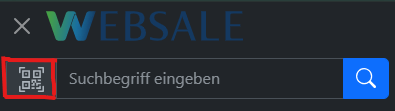
With the help of this function, customers can call up products via QR code or barcode and add them to the basket. A scanner icon in the search field opens the camera in full-screen mode. If a URL is scanned, a direct redirection takes place. If, on the other hand, a barcode is scanned, the product with the scanned ID is placed directly into the basket.
***
## Modules
The following modules are relevant for the integration of Scan & Order:
* [\$wsViews](/en/frontend/referenz/module/wsviews) - current URL, destination pages, view URLs
***
## Frontend integration
### Dependencies
The scanner is based on the open-source library [html5-qrcode.](https://github.com/mebjas/html5-qrcode) The file `html5-qrcode.min.js` is stored in the `scripts/` directory and is only included via lazy load when the scanner is opened.
### QR button in the search field
The button is placed directly in front of the search field within the `ws-search-box` component and opens the scanner. Depending on the end device, it appears in the following locations:
* in the desktop search bar of the header
* in the mobile offcanvas navigation menu
The integration into the header is done via the file `components/layout/header.htm`:
```html theme={"theme":{"light":"github-light","dark":"github-dark"},"languages":{"custom":["/languages/websale.json"]}}
...
```
The button must be placed identically both in the desktop header and in the mobile offcanvas menu. Using the attribute `aria-label=%QRCodeBtnTitle%`, the shop text snippets are used for accessibility.
### Modal window
The full-screen modal is inserted once in the base layout. The area `#wsQRScanner` is responsible for displaying the camera preview from `HTML5-QR-Code`.
The integration is done via the file `layouts/default.htm`:
```text theme={"theme":{"light":"github-light","dark":"github-dark"},"languages":{"custom":["/languages/websale.json"]}}
%%QrScan%%
```
### JavaScript constant
The path to the library is set as a JavaScript variable in the `{{ autoescape "js" }}` block of the layout file `layouts/default.htm`.
```javascript theme={"theme":{"light":"github-light","dark":"github-dark"},"languages":{"custom":["/languages/websale.json"]}}
{{ autoescape "js" }}
{{ var $cAddToBasketTarget = $wsViews.viewUrl("basket.htm") }}
{{ var $cAddToBasketParams = { wscsrf: $wsActions.csrfToken, quantity: 1 } }}
{{ var $cAddToBasketLink = $wsActions.url("BasketItemAdd", $cAddToBasketTarget, $cAddToBasketParams) }}
{{ /autoescape }}
```
### Scanner logic
The following code block is to be inserted into the file `scripts/wsGlobal.js`. The flow is as follows:
1. When the scanner is opened for the first time, `html5-qrcode.min.js` is loaded.
2. If the library was already loaded, the scanner is started directly via `wsInitQRScan()`.
3. `html5-qrcode` starts the camera and shows the preview in the `#wsQRScanner` area.
4. After a successful scan, URL codes redirect directly to the scanned URL — barcodes place the product with the scanned ID directly into the basket.
5. When the window is closed, the camera is stopped.
```javascript theme={"theme":{"light":"github-light","dark":"github-dark"},"languages":{"custom":["/languages/websale.json"]}}
// ---------------------------------------------------------- QR code scanner - start
// const html5QrCode and function wsInitQRScan is in script html5-qrcode.min.js
function wsInitQRScan() {
Html5Qrcode.getCameras().then(devices => {
if (devices && devices.length) {
// use this to start scanning
html5QrCode.start(
{
facingMode: "environment"
},
{
fps: 10,
qrbox: { width: 250, height: 250 }
},
(decodedText, decodedResult) => {
// do something when code is read
html5QrCode.stop().then((ignore) => {
// QR Code scanning is stopped
if (decodedText.startsWith("http")) {
// execute QR code if code is a URL
location.href = decodedText;
} else {
// execute WEBSALE search if Barcode
location.href = wsAddToBasketLink + "&productId=" + decodedText;
}
}).catch((err) => {
// Stop failed, handle it
});
},
(errorMessage) => {
// parse error, ignore it
})
.catch((err) => {
// Start failed, handle it
}
);
}
}).catch(err => {
// access denied
});
}
document.querySelector("#wsQRCodeScanModal").addEventListener("show.bs.modal", function(e) {
var wsQRCodeScanScript = document.querySelector("#wsQRCodeScanScript");
if (!wsQRCodeScanScript) {
// lazyload script for better performance
var script = document.createElement("script");
script.setAttribute("id", "wsQRCodeScanScript");
script.setAttribute("src", wsQRCodeJS);
document.head.appendChild(script);
} else {
// execute function if script is already loaded
wsInitQRScan();
}
});
document.querySelector("#wsQRCodeScanModal").addEventListener("hidden.bs.modal", function(e) {
html5QrCode.stop().then((ignore) => {
// QR Code scanning is stopped
}).catch((err) => {
// Stop failed, handle it
});
});
// ---------------------------------------------------------- QR code scanner - end
```
***
## Further links
* [html5-qrcode on GitHub](https://github.com/mebjas/html5-qrcode) - Documentation and configuration options of the scanner library
 * in the mobile offcanvas navigation menu