> ## Documentation Index
> Fetch the complete documentation index at: https://dokumentation.websale.de/llms.txt
> Use this file to discover all available pages before exploring further.

# Product comparison

> The product comparison lets customers compare several products of the same category side by side. This guide shows you how to set it up in the template.

The product comparison collects products in a session-wide list and displays them side by side on a dedicated comparison page in a table. A customer adds products from the respective product detail page and then opens the comparison page. There, they see all fields of the selected products in a table next to each other. Rows in which the values differ can be highlighted with color.

To prevent nonsensical comparisons (for example, comparing pants next to a laptop), the shop only allows products of the same category in the comparison list. The category is defined via a product field.

<Info>
  The feature is a template extension and not a core function of the shop system. There is no dedicated configuration for it in the admin interface - control happens exclusively via the template files described here.
</Info>

## Prerequisites

For the product comparison to work meaningfully, the category field on the product must be maintained. If it is missing, products can still be compared, but without protection against cross-category comparisons. The shop requires a free product field that contains the category of a product as text (for example, `Clothing`, `Electronics`, `Cat food`). In the BestPractice shop, this field has the technical name `mainCategory`. If the field is empty on a product, that product is rejected when being added to an existing comparison list as soon as the list already has a category set (see [How the product comparison works](#how-the-product-comparison-works)).

<Warning>
  The technical field name is decisive, not the label name shown in the admin interface. If the name cannot be determined immediately, an output of all free fields of a product on the product page helps: `{{= $cProduct.custom | json }}`. The output shows all technical field names with their current values.
</Warning>

## Terms and technical names at a glance

| Concept                          | Session                               | Template (product.htm / compare.htm)                              |
| -------------------------------- | ------------------------------------- | ----------------------------------------------------------------- |
| List of compared product IDs     | `compareIds` (comma-separated string) | `$compareIds` (prepared as an array)                              |
| Currently set category           | `compareType`                         | `$compareType`                                                    |
| Category of a product            | —                                     | `$cProduct.custom.mainCategory`                                   |
| Action for writing the session   | —                                     | `$wsActions.create("SessionUpdate")`                              |
| Comparison page (dedicated view) | —                                     | `views/compare.htm`, called via `$wsViews.viewUrl('compare.htm')` |

<Note>
  The session stores `compareIds` as a comma-separated string (`"123,456,789"`), not as an array. The reason is that `$wsSession.set()` does not write a value for an empty array; an empty string, on the other hand, can be reliably stored and read. In the template, the string is split back into an array via `split(",")` on each call.
</Note>

## How the product comparison works

When attempting to add a product to the comparison list, the shop checks the category in the following order:

1. **The list is empty.** The product is included regardless of its category. Its category (`mainCategory`) is set as the session-wide comparison category (`compareType`).
2. **The list already contains products and the category of the new product matches the set comparison category.** The product is included.
3. **The category does not match (or is empty on the product).** The product is not included. On the product page, a hint text with the currently valid category appears in place of the "Add" link.

If the list is completely emptied (last product removed or via "Clear comparison"), the set comparison category is also reset. Afterwards, the customer can start again with any category.

Additionally, the list is limited to a specific number of products, which can be adjusted freely in the template. If the limit is reached, a corresponding notice appears instead of the "Add" link.

<Note>
  The maximum number of comparable products is hard-coded in the template code (`len($compareIds) >= 4`) and is not a setting in the admin interface. A different limit can only be achieved by changing this number directly in the template.
</Note>

## Display in the shop

### Button on the product detail page

On the product page, one of four variants appears depending on the state:

| State                                                    | Display                                      |
| -------------------------------------------------------- | -------------------------------------------- |
| Product is already in the list                           | Link "Already in comparison – remove"        |
| Category differs from the set category                   | Hint text with the valid category, no link   |
| The list already contains the maximum number of products | Notice "Max. products in comparison reached" |
| None of the above cases                                  | Link "Add to comparison"                     |

### Badge in the header

In the header, an icon with a counter shows the current number of compared products and links to the comparison page. The counter only appears if at least one product is in the list.

### Comparison page

The comparison page (`views/compare.htm`) lists all products of the current comparison list in a table: one product card per column (image, name, price, link to the product page), followed by price, item number, description, category, and all other maintained free fields. Fields that carry no value on any of the compared products are not displayed. Rows in which the values differ are highlighted with color so that differences can be recognized at a glance even with many fields.

If the list is empty, an empty state appears with a link back to the shop.

## Modules

The following modules are used to implement the product comparison:

* [\$wsSession](/frontend/referenz/module/wssession) - storing and reading the comparison list (`compareIds`) and the set category (`compareType`).
* [Actions - overview](/frontend/referenz/aktionen) - `SessionUpdate` action to write the session before the page is rendered.
* [\$wsProducts](/frontend/referenz/module/wsproducts) - loading the product data for each ID in the comparison list on the comparison page.

## Setup

The product comparison affects three template files: the product detail page (`product.htm`), the header (`header.htm` or the embedded header component), and a comparison page to be newly created (`views/compare.htm`). The following steps build on each other and should be implemented in this order.

### Step 1: Provide the category field on the product

If it does not yet exist, create a free product field for the category (see [Prerequisites](#prerequisites)). In this guide, the field is called `mainCategory`. Maintain it on all products that should participate in the comparison.

#### Create the custom field

If such a field does not yet exist in your shop, you can create it in the admin interface as follows.

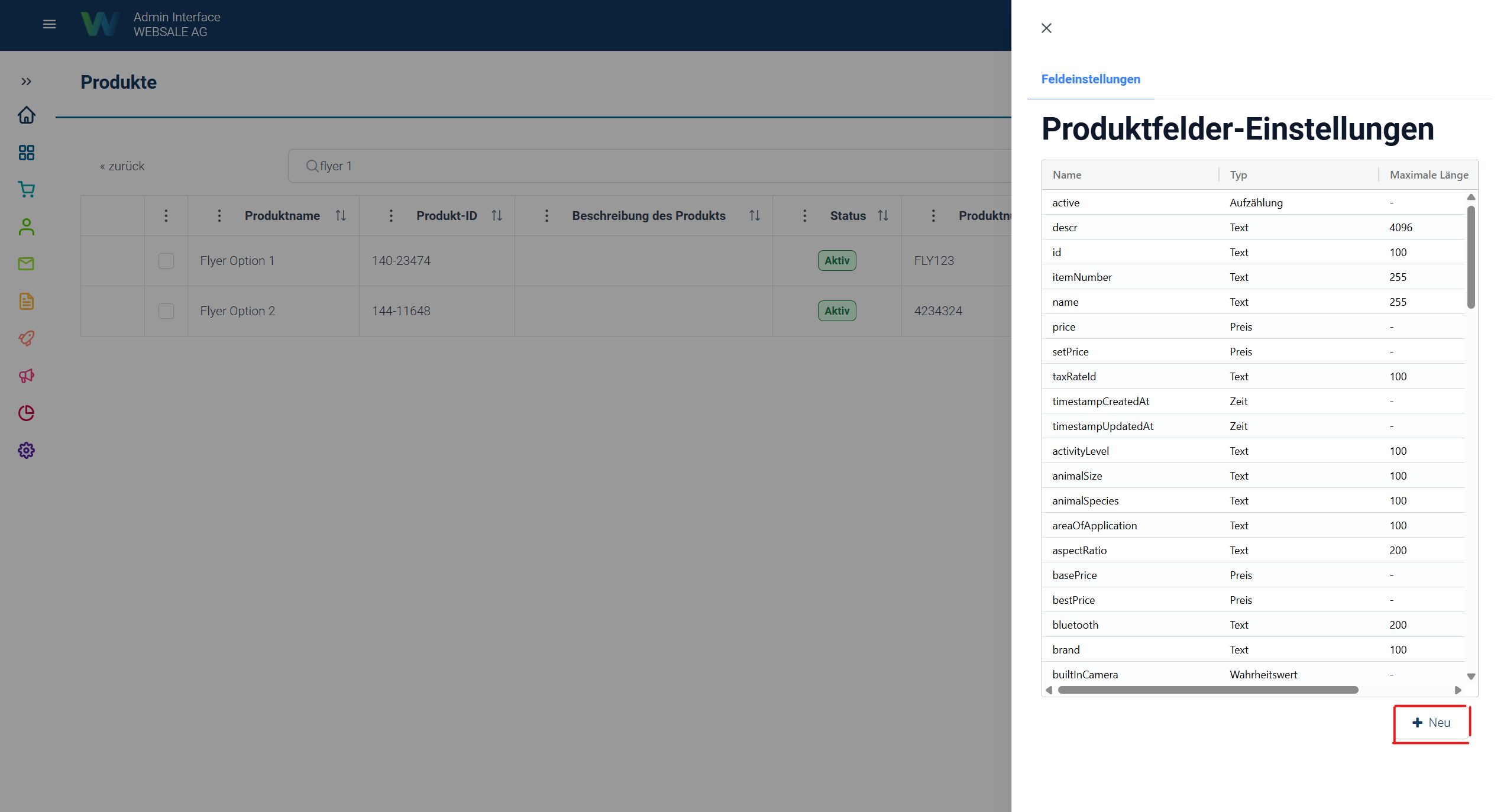
1. Under *Catalog → Products → Settings → "+ New"*, a new product field can be created.
   <Frame>
     <img src="https://mintcdn.com/websaleag-44ee7ea6/W45TXPOqP8igr_zC/images/websale-admin-produktfeld-hinzufuegen.png?fit=max&auto=format&n=W45TXPOqP8igr_zC&q=85&s=14cba35f5df763574950a53e03a51272" alt="Websale Admin Add Product Field" width="2548" height="1373" data-path="images/websale-admin-produktfeld-hinzufuegen.png" />
   </Frame>
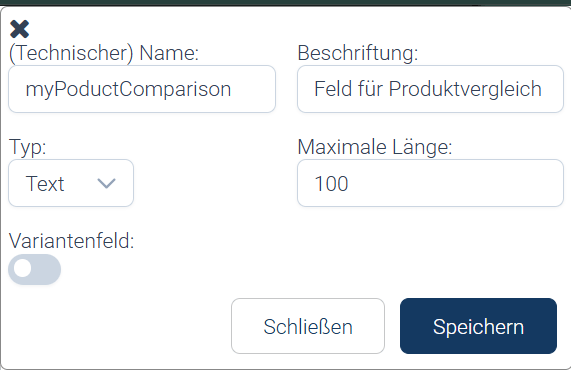
2. Assign a unique technical name to your product field and save it.
   <Frame>
     <img src="https://mintcdn.com/websaleag-44ee7ea6/W45TXPOqP8igr_zC/images/websale-admin-produktfeld-hinzufuegen-speichern.png?fit=max&auto=format&n=W45TXPOqP8igr_zC&q=85&s=9f9e906044b942fece8f50923f7c5c48" alt="Websale Admin Save Added Product Field" width="571" height="370" data-path="images/websale-admin-produktfeld-hinzufuegen-speichern.png" />
   </Frame>
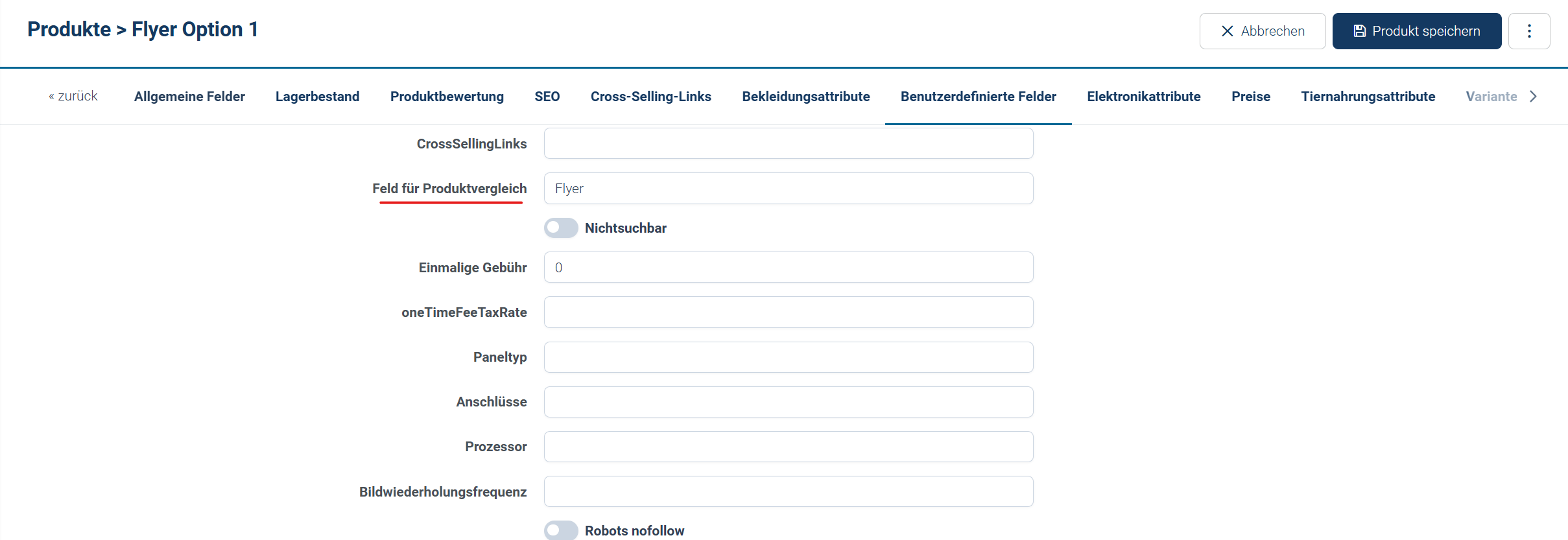
3. Afterwards, the field is available on the product and can be filled in. In this example, the product type **Flyer** is used, matching the product **Flyer Option 1**.
   <Frame>
     <img src="https://mintcdn.com/websaleag-44ee7ea6/W45TXPOqP8igr_zC/images/websale-admin-produktfeld-hinzufuegen-eintragung.png?fit=max&auto=format&n=W45TXPOqP8igr_zC&q=85&s=01274152cb0f2a89ef4ad51e330feacb" alt="Websale Admin Product Field Added Entry" width="2418" height="833" data-path="images/websale-admin-produktfeld-hinzufuegen-eintragung.png" />
   </Frame>

#### Maintain the field on products

For the category check to work reliably, the field must be filled with a value on all products. Products without a value are excluded from the comparison as soon as a product with a value is already in the comparison list.

| Situation                                                           | Behavior                                                                                                                                                                                  |
| ------------------------------------------------------------------- | ----------------------------------------------------------------------------------------------------------------------------------------------------------------------------------------- |
| First product in the comparison list has the value "Clothing"       | The category is set as the comparison type.<br />From now on, every additional product is checked to see whether it has the same value and can therefore also be added to the comparison. |
| Additional product for the comparison list has the value "Clothing" | The product can be added to the comparison list.                                                                                                                                          |
| Additional product has the value "Electronics"                      | The product cannot be added to the comparison list. A corresponding notice is displayed on the product.                                                                                   |
| Additional product has no entered value                             | The product cannot be added to the comparison list. A corresponding notice is displayed on the product.                                                                                   |
| Comparison list is emptied                                          | Any product can be added to the comparison list next.                                                                                                                                     |

### Step 2: Read the comparison list in `product.htm`

Open `product.htm` and insert the following section at the very top of the `content_main` block, before the actual page output. It reads the current state of the comparison list from the session and prepares it for further use:

```html theme={"theme":{"light":"github-light","dark":"github-dark"},"languages":{"custom":["/languages/websale.json"]}} theme={"theme":{"light":"github-light","dark":"github-dark"},"languages":{"custom":["/languages/websale.json"]}}
{{ var $compareIdsRaw = $wsSession.get("compareIds") | ifNull("") }}
{{ var $compareIds = [] }}
{{ if $compareIdsRaw != "" }}
  {{ foreach $id in split($compareIdsRaw, ",") }}
    {{ push($compareIds, $id) }}
  {{ /foreach }}
{{ /if }}
{{ var $compareTypeRaw = $wsSession.get("compareType") }}
{{ var $compareType = "" }}
{{ if $compareTypeRaw }}
  {{ $compareType = $compareTypeRaw }}
{{ /if }}
```

**Result** <br />From this point on, `$compareIds` is available as an array of product IDs, `$compareType` contains the currently set category or an empty string if the list is empty. Both variables are needed in the next steps.

### Step 3: Add the button area in `product.htm`

At the location where the comparison button should appear (for example, below the basket form), insert the following block. It calculates the appropriate form content depending on the state and passes it to the `SessionUpdate` action. The maximum number of 4 products (`$maxReached`) can be adjusted here by changing the number to your desired limit:

```html theme={"theme":{"light":"github-light","dark":"github-dark"},"languages":{"custom":["/languages/websale.json"]}} theme={"theme":{"light":"github-light","dark":"github-dark"},"languages":{"custom":["/languages/websale.json"]}}
{{ var $alreadyInCompare = $cProduct.id in $compareIds }}
{{ var $maxReached = len($compareIds) >= 4 }}
{{ var $productCategory = $cProduct.custom.mainCategory | ifNull("") }}
{{ var $typeMismatch = $compareType != "" and $productCategory != "" and $compareType != $productCategory }}

{{ var $myActionCompareUpdate = $wsActions.create("SessionUpdate") }}

<div id="wsCompareWidget">
  {{ if $alreadyInCompare }}
    {{ var $removeIds = [] }}
    {{ foreach $id in $compareIds }}
      {{ if $id != $cProduct.id }}
        {{ push($removeIds, $id) }}
      {{ /if }}
    {{ /foreach }}
    {{ var $removeIdsStr = join($removeIds, ",") }}
    {{ var $removeTypeStr = $compareType }}
    {{ if len($removeIds) == 0 }}
      {{ $removeTypeStr = "" }}
    {{ /if }}
    <form method="post" action="{{= $wsViews.current.url() }}" data-ws-ajax-form>
      <input type="hidden" name="wsReplaceIds" value="wsCompareWidget,wsCompareHeaderBadge">
      <input type="hidden" name="wscsrf" value="{{= $myActionCompareUpdate.csrf }}">
      <input type="hidden" name="wsact" value="{{= $myActionCompareUpdate.id }}">
      <input type="hidden" name="session.compareIds" value="{{= $removeIdsStr }}">
      <input type="hidden" name="session.compareType" value="{{= $removeTypeStr }}">
      <button type="submit">Already in comparison – remove</button>
    </form>
  {{ elseif $typeMismatch }}
    <p>Only "{{= $compareType }}" comparable</p>
  {{ elseif $maxReached }}
    <p>Max. products in comparison reached</p>
  {{ else }}
    {{ var $addIds = [] }}
    {{ foreach $id in $compareIds }}
      {{ push($addIds, $id) }}
    {{ /foreach }}
    {{ push($addIds, $cProduct.id) }}
    {{ var $addIdsStr = join($addIds, ",") }}
    {{ var $addTypeStr = $compareType }}
    {{ if $addTypeStr == "" }}
      {{ $addTypeStr = $productCategory }}
    {{ /if }}
    <form method="post" action="{{= $wsViews.current.url() }}" data-ws-ajax-form>
      <input type="hidden" name="wsReplaceIds" value="wsCompareWidget,wsCompareHeaderBadge">
      <input type="hidden" name="wscsrf" value="{{= $myActionCompareUpdate.csrf }}">
      <input type="hidden" name="wsact" value="{{= $myActionCompareUpdate.id }}">
      <input type="hidden" name="session.compareIds" value="{{= $addIdsStr }}">
      <input type="hidden" name="session.compareType" value="{{= $addTypeStr }}">
      <button type="submit">Add to comparison</button>
    </form>
  {{ /if }}
</div>
```

<Warning>
  The surrounding `<div id="wsCompareWidget">` is required. Via this ID, `wsReplaceIds` specifically replaces this area when the form is submitted, without reloading the rest of the page.
</Warning>

**Result** <br />On the product page, the appropriate button or hint text appears automatically depending on the current state (see [Display in the shop](#button-on-the-product-detail-page)).

### Step 4: Add the badge in the header

Open the header file (`header.htm` or the correspondingly embedded component of your template) and insert the following block in the area of the other icons (watchlist, basket):

```html theme={"theme":{"light":"github-light","dark":"github-dark"},"languages":{"custom":["/languages/websale.json"]}} theme={"theme":{"light":"github-light","dark":"github-dark"},"languages":{"custom":["/languages/websale.json"]}}
{{ var $compareIdsRaw = $wsSession.get("compareIds") | ifNull("") }}
{{ var $compareCount = 0 }}
{{ if $compareIdsRaw != "" }}
  {{ foreach $id in split($compareIdsRaw, ",") }}
    {{ $compareCount = $compareCount + 1 }}
  {{ /foreach }}
{{ /if }}
<span id="wsCompareHeaderBadge">
  <a href="{{= $wsViews.viewUrl('compare.htm') }}" title="Product comparison">
    {{# Icon of your choice #}}
    {{ if $compareCount > 0 }}
      <div class="badge">{{= $compareCount }}</div>
    {{ /if }}
  </a>
</span>
```

<Warning>
  Here, too, the surrounding ID (`wsCompareHeaderBadge`) is required so that the counter is updated via AJAX when a product is added or removed (see `wsReplaceIds` in step 3 and step 5).
</Warning>

**Result** <br />In the header, an icon with a counter appears that links to the comparison page. The counter updates when a product is added or removed without reloading the page.

### Step 5: Create the comparison page

Create a new file `views/compare.htm`. It is a standalone view and is called via `{{= $wsViews.viewUrl('compare.htm') }}` (see step 4). The file first reads the session state - identical to step 2:

```html theme={"theme":{"light":"github-light","dark":"github-dark"},"languages":{"custom":["/languages/websale.json"]}} theme={"theme":{"light":"github-light","dark":"github-dark"},"languages":{"custom":["/languages/websale.json"]}}
{{ var $compareIdsRaw = $wsSession.get("compareIds") | ifNull("") }}
{{ var $compareIds = [] }}
{{ if $compareIdsRaw != "" }}
  {{ foreach $id in split($compareIdsRaw, ",") }}
    {{ push($compareIds, $id) }}
  {{ /foreach }}
{{ /if }}
{{ var $compareTypeRaw = $wsSession.get("compareType") }}
{{ var $compareType = "" }}
{{ if $compareTypeRaw }}
  {{ $compareType = $compareTypeRaw }}
{{ /if }}
```

This is followed by the remaining HTML structure of the page (`<!DOCTYPE html>`, dedicated `<head>` with stylesheet, `<body>`). Since `compare.htm` is a standalone view, no shop layout is embedded - the header and footer areas of the page must be added yourself, if desired.

Within the page body, the "Clear comparison" button follows first:

```html theme={"theme":{"light":"github-light","dark":"github-dark"},"languages":{"custom":["/languages/websale.json"]}} theme={"theme":{"light":"github-light","dark":"github-dark"},"languages":{"custom":["/languages/websale.json"]}}
{{ if len($compareIds) > 0 }}
{{ var $myActionCompareClear = $wsActions.create("SessionUpdate") }}
<form method="post" action="{{= $wsViews.viewUrl('compare.htm') }}" data-ws-ajax-form>
  <input type="hidden" name="wsReplaceIds" value="wsCompareWrapper,wsCompareHeaderBadge">
  <input type="hidden" name="wscsrf" value="{{= $myActionCompareClear.csrf }}">
  <input type="hidden" name="wsact" value="{{= $myActionCompareClear.id }}">
  <input type="hidden" name="session.compareIds" value="">
  <input type="hidden" name="session.compareType" value="">
  <button type="submit">Clear comparison</button>
</form>
{{ /if }}
```

If the list is empty, an empty state with a link back to the shop is displayed at this point (`{{ if len($compareIds) == 0 }} ... {{ else }} ...`). Otherwise, the product data is loaded:

```html theme={"theme":{"light":"github-light","dark":"github-dark"},"languages":{"custom":["/languages/websale.json"]}} theme={"theme":{"light":"github-light","dark":"github-dark"},"languages":{"custom":["/languages/websale.json"]}}
{{ var $products = [] }}
{{ foreach $id in $compareIds }}
  {{ var $p = $wsProducts.load($id) }}
  {{ push($products, $p) }}
{{ /foreach }}
```

For each product, a product card with its own remove button is output. Since several such forms occur on the same page, each action receives a `tag` to distinguish them from each other:

```html theme={"theme":{"light":"github-light","dark":"github-dark"},"languages":{"custom":["/languages/websale.json"]}} theme={"theme":{"light":"github-light","dark":"github-dark"},"languages":{"custom":["/languages/websale.json"]}}
{{ foreach $p in $products }}
  {{ var $keepIds = [] }}
  {{ foreach $id2 in $compareIds }}
    {{ if $id2 != $p.id }}
      {{ push($keepIds, $id2) }}
    {{ /if }}
  {{ /foreach }}
  {{ var $keepIdsStr = join($keepIds, ",") }}
  {{ var $keepTypeStr = $compareType }}
  {{ if len($keepIds) == 0 }}
    {{ $keepTypeStr = "" }}
  {{ /if }}
  {{ var $myActionCompareRemove = $wsActions.create("SessionUpdate", tag=$p.id) }}

  <form method="post" action="{{= $wsViews.viewUrl('compare.htm') }}" data-ws-ajax-form>
    <input type="hidden" name="wsReplaceIds" value="wsCompareWrapper,wsCompareHeaderBadge">
    <input type="hidden" name="wscsrf" value="{{= $myActionCompareRemove.csrf }}">
    <input type="hidden" name="wsact" value="{{= $myActionCompareRemove.id }}">
    <input type="hidden" name="session.compareIds" value="{{= $keepIdsStr }}">
    <input type="hidden" name="session.compareType" value="{{= $keepTypeStr }}">
    <button type="submit">Remove</button>
  </form>
  {{# Image, name, price, link to the product page follow here #}}
{{ /foreach }}
```

<Warning>
  The entire page content ("Clear comparison" button, empty state, and product table) must be enclosed in a common container with the ID `wsCompareWrapper`. Only this way can `wsReplaceIds` update the complete comparison page in one go when removing or clearing.
</Warning>

**Result** <br />The comparison page shows all products of the list with its own remove button per product and a button to completely clear the list.

### Step 6: Build the comparison table with dynamic fields

The actual comparison table follows the product cards. Fixed rows such as price, item number, and category are output directly. For the remaining, freely maintained product fields, it is first determined which field names carry a value on at least one of the products:

```html theme={"theme":{"light":"github-light","dark":"github-dark"},"languages":{"custom":["/languages/websale.json"]}} theme={"theme":{"light":"github-light","dark":"github-dark"},"languages":{"custom":["/languages/websale.json"]}}
{{ var $skipFields = ["image", "mainCategory", "brand", "crossSelling", "crosslinks"] }}

{{ var $allKeys = [] }}
{{ foreach $p in $products }}
  {{ foreach $key in keys($p.custom) }}
    {{ if not ($key in $skipFields) }}
      {{ if not ($key in $allKeys) }}
        {{ push($allKeys, $key) }}
      {{ /if }}
    {{ /if }}
  {{ /foreach }}
{{ /foreach }}
```

<Note>
  `$skipFields` contains the fields that are already output via their own, hard-coded table rows (for example the image or the category), so that they do not appear a second time in the dynamic list. Adjust this list to the field names used in your shop.
</Note>

For each remaining field, it is checked whether at least one product carries a value and whether the values differ between the products:

```html theme={"theme":{"light":"github-light","dark":"github-dark"},"languages":{"custom":["/languages/websale.json"]}} theme={"theme":{"light":"github-light","dark":"github-dark"},"languages":{"custom":["/languages/websale.json"]}}
{{ foreach $key in $allKeys }}
  {{ var $hasValue = false }}
  {{ foreach $p in $products }}
    {{ if $p.custom[$key] }}
      {{ $hasValue = true }}
    {{ /if }}
  {{ /foreach }}

  {{ if $hasValue }}
    {{ var $firstVal = $products[0].custom[$key] | ifNull("") }}
    {{ var $allSame = true }}
    {{ foreach $p in $products }}
      {{ if ($p.custom[$key] | ifNull("")) != $firstVal }}
        {{ $allSame = false }}
      {{ /if }}
    {{ /foreach }}
    <tr>
      <td class="{{ if not $allSame }}highlight{{ /if }}">{{= $key }}</td>
      {{ foreach $p in $products }}
      <td class="{{ if not $allSame }}highlight{{ /if }}">
        {{ if $p.custom[$key] }}{{= $p.custom[$key] }}{{ else }}–{{ /if }}
      </td>
      {{ /foreach }}
    </tr>
  {{ /if }}
{{ /foreach }}
```

**Result** <br />Fields that carry no value on any of the compared products do not appear in the table. Rows in which the values differ between the products receive the CSS class `highlight` and can thus be visually highlighted (for example, with a colored background).

## Further links

* [\$wsSession](/frontend/referenz/module/wssession) - storing and reading session-wide values.
* [Actions - overview](/frontend/referenz/aktionen) - how actions work, in particular processing before rendering and execution via AJAX using `wsReplaceIds`.
* [\$wsProducts](/frontend/referenz/module/wsproducts) - loading individual products by their ID.
* [\$wsViews](/frontend/referenz/module/wsviews) - generating view URLs for custom views such as `compare.htm`.


## Related topics

- [checkout - Order flow](/en/konfiguration/checkout-bestellablauf.md)
- [Validation and checking services](/en/konfiguration/validierungs-und-prufservices.md)
- [Functions](/en/frontend/referenz/funktionen.md)
- [API reference products](/en/schnittstellen/admin-interface-api/api-referenz-produkte.md)
- [Operators](/en/frontend/referenz/operatoren.md)